



This is not a product announcement. It is a build log with the workings left in — what I decided, what I got wrong, which models I used at which stage, and the workflow that made a one-month rebuild of a production platform possible at all. If you are building with AI coding agents, the second half of this article is the part worth your time. If you are evaluating AI for your own company, the first half is.
In December 2025, I was already fairly fluent at coding with agents. My setup was modest by today’s standards: Augment Code as a VS Code extension, one agent at a time, one conversation, one context window. That is how Gen-1 Lumina was built.
The idea itself had been sitting with me for a while. Let a company upload its own knowledge — what it does, what it sells, the ins and outs of how it operates — and then let it drop a chat widget onto its website in minutes. That is it. Almost embarrassingly simple, and precisely because of that, powerful.
I think we are living through a moment that maps almost exactly onto the early web. There was a point at which every company suddenly understood that it needed a website. We are at the equivalent point with AI. Companies now understand that AI can help them — meaningfully, today — and the entry-level move, the one that requires no restructuring and no data science team, is a chat assistant that actually knows the business. Gen-1 made that a widget you embed. Hence the name, and hence the domain we still carry: luminawidget.xyz. The app has since become something considerably larger, but the name kept the receipt.
Gen-1 had exactly one design goal: make the UI and UX so simple that anybody could deploy their own AI-powered assistant on their website in minutes. Four tabs. That was the whole product.
1. Knowledge — drop in what you want the agent to know.
2. Playground — test that knowledge and tune the source files until the answers are right.
3. Widget Builder — match the widget to your branding.
4. Subscription — see your usage and pick a plan.
It reached 100 users quickly and with almost no support burden, which I attribute entirely to the narrowness of the surface. There was very little to get wrong.
The customers were small service businesses: hairdressers, massage salons, restaurants, small hotels. Support-heavy businesses whose owners are also the support desk. The results were better than I expected. At a Thai massage salon in Ljubljana we measured up to 300 messages a day — 300 times a day the assistant answered a customer, which drove bookings up. But the number I care about more is the inverse one: those were 300 questions the staff did not have to answer on the phone. For a small team, that is not a feature, it is hours back.
Simple, but not small. The value was never in the sophistication of the interface — it was in the fact that the answers were right.
Before Lumina existed I spent roughly two years researching Retrieval-Augmented Generation — IBM Docling, a parade of open-source frameworks, every chunking and embedding strategy I could get my hands on. Across that work I could not reliably push accuracy past 60–80%. For a demo that is impressive. For a business answering its own customers, it is unusable. An assistant that is wrong one time in four is worse than no assistant, because it manufactures confident misinformation under your logo.
The diagnosis was always the same: chunking destroys context. You retrieve three fragments, the model has nothing to hold onto around them, and it fills the gap. That is not a model defect. That is an architecture defect.
What changed the calculus was the arrival of million-token context windows. Lumina does not chunk and it does not vectorise. Every document you upload is injected into the context window in full, on every question. The model is not guessing at what might be relevant — it has the whole corpus in front of it. That, plus a system-level grounding preamble that instructs the model to say plainly when something is not in the documents, is why Lumina does not hallucinate in the way retrieval systems do.
It is somewhat more expensive per call. With Gemini’s context caching, that difference is minor. And you cannot put a price on the validity of an answer — least of all in an enterprise context, where a wrong answer is not a bad user experience, it is a liability.
There are honest boundaries, and we publish them. The interface guides deployers toward a soft ceiling of around 750,000 tokens of knowledge, and there is a hard backend limit at 900,000. Past that the system declines to answer with a clear message rather than silently truncating your knowledge base and answering from half of it. A knowledge meter in the app shows exactly how full the agent’s memory is. In practice almost every small-business knowledge base lands in the tens of thousands of tokens — comfortably inside both.
Gen-1 was built in React, predominantly with Anthropic’s Haiku 4.5 — the simplest and cheapest model in the lineup at the time. It did a genuinely good job. I brought in Opus for security audits and hardening passes, but the bulk of the code came from Haiku.
And here is the decision that mattered more than any model choice: from the very first commit, I kept the project documentation current with every single update. Not at milestones — with every update. Half a year later, when I started the migration to Gen-2, that documentation corpus was the thing that made the migration possible. I will come back to this, because it is the central lesson of the whole project.
For half a year I presented Lumina to a lot of people, increasingly to an enterprise audience. The feedback converged with unusual consistency, and it was not about features.
• Where does the data live? The EU AI Act and GDPR turned this from a procurement checkbox into a deal-breaker. The answer has to be: in Europe. All of it. Nothing leaves.
• Can we run it on-premise? A recurring request, particularly from regulated sectors — run the model locally, keep the storage in our own building.
• Who can see what? Team roles, access logs, and a clear story about vendor access to their account.
• What happens when a customer asks us to delete their data? The client is the controller and is legally on the hook — but only the platform can technically execute it.
None of that is glamorous. All of it is what separates a tool people like from a tool a compliance officer will sign off on. Gen-2 exists because of that list.
Gen-2 is not Gen-1 with features bolted on. The architecture underneath was separated, moved and rebuilt. What follows is the honest inventory.
This is the section enterprise buyers read first, so it goes first. There are three separate residency questions and they are routinely collapsed into one. They had different answers for most of Lumina’s life.
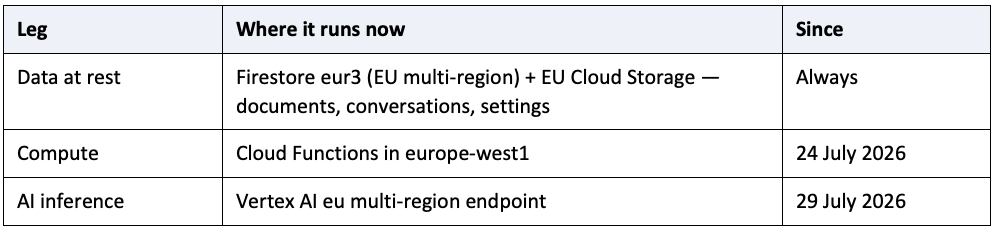
The inference move deserves stating precisely, because it is recent and because the earlier position was weaker than most people assumed. Until 29 July 2026 Lumina reached its model through an interface that Google documents as serving from a global pool. In plain terms: an account’s knowledge base and conversation context left the EU on every single question. Storing data in eur3 protected it at rest and did nothing else.
All four things Lumina asks a model to do now go through the Vertex AI eu endpoint: generating the reply your customer reads, summarising a conversation for the Insights screen, answering the account holder’s own questions about their conversations, and counting tokens in an uploaded document. The model also changed, now Gemini 3.1 Flash Lite, same behaviour. What moved is the geography of the processing. Scheduled background jobs moved too; the monthly quota reset was the last one still executing outside the EU, and it moved on 30 July.
Lumina is a limited-risk, transparency-tier AI system under Regulation (EU) 2024/1689. It performs none of the Annex III high-risk activities — no biometrics, no hiring, no credit scoring, no essential-services gating. Its binding obligation is the Article 50(1) transparency duty: end users must be told they are interacting with an AI. That duty starts 2 August 2026.
We ship the disclosure inside the product, on by default, and an account holder cannot switch it off. The website widget carries a persistent disclosure; Telegram, Discord and WhatsApp deliver it at or before the first interaction in every conversation, including on /start. Because it is default-on for every deployment, every client is covered automatically the moment they embed the widget. That is the design principle: turnkey compliance the deployer does not have to think about.
The same logic extends to the headless integration. If you use Lumina as the engine behind your own chat interface, the disclosure becomes your responsibility, so we ship a one-line mountDisclosure() call rather than leaving you to work it out.
This is the distinction that most vendors miss, and it is the one that matters commercially. Data-subject rights can be exercised at two levels, and they are not the same feature.
• Level 1 — the business’s own account. A client can download everything (a structured JSON export, per Article 20) or delete the account entirely, from a dedicated Account page. Deletion is genuinely complete: it closes out the integration tokens, the WhatsApp number index, the Discord guild index, and — the one everybody forgets — it revokes the Google Calendar refresh token at Google rather than merely deleting the local copy.
• Level 2 — the client’s own end users. When a client’s customer asks to be forgotten, the client is the controller and owes the answer, but only Lumina can technically execute it. From the Conversations inbox, the “…” menu on a conversation gives Download conversation, Delete conversation, and — in a one-to-one chat only — Delete everything from this contact.
Two details in there took real thought. First, contact-wide deletion is refused wherever the “contact” is actually a room. A Discord channel or a Telegram group is a place, not a person; pressing that button there would erase everybody else’s messages while the dialog promised one person’s. It is refused in the interface and refused again server-side. Second, every erasure writes a content-free receipt — counts, ids, timestamps, and the names of the fields destroyed, never the content — so the client keeps its own proof of compliance. That receipt is the one collection in the entire system with deliberately no expiry, because proof that expires proves nothing.
And a boundary I insist on: Lumina staff cannot press either button for a client, even inside an authorised support session. The server refuses it and writes the refusal to the client’s access log with the staff member’s name on it. “Our vendor deleted our customer data during a support session” is a sentence no audit survives.
Gen-1 was a widget. Gen-2 is a channel platform, and this is where the roadmap opened up most unexpectedly. Every channel calls the same server-side answering engine — the same knowledge base, the same persona, the same calendar. There is no drift-prone separate bot per channel. Adding WhatsApp did not fork the assistant; it added a front door.
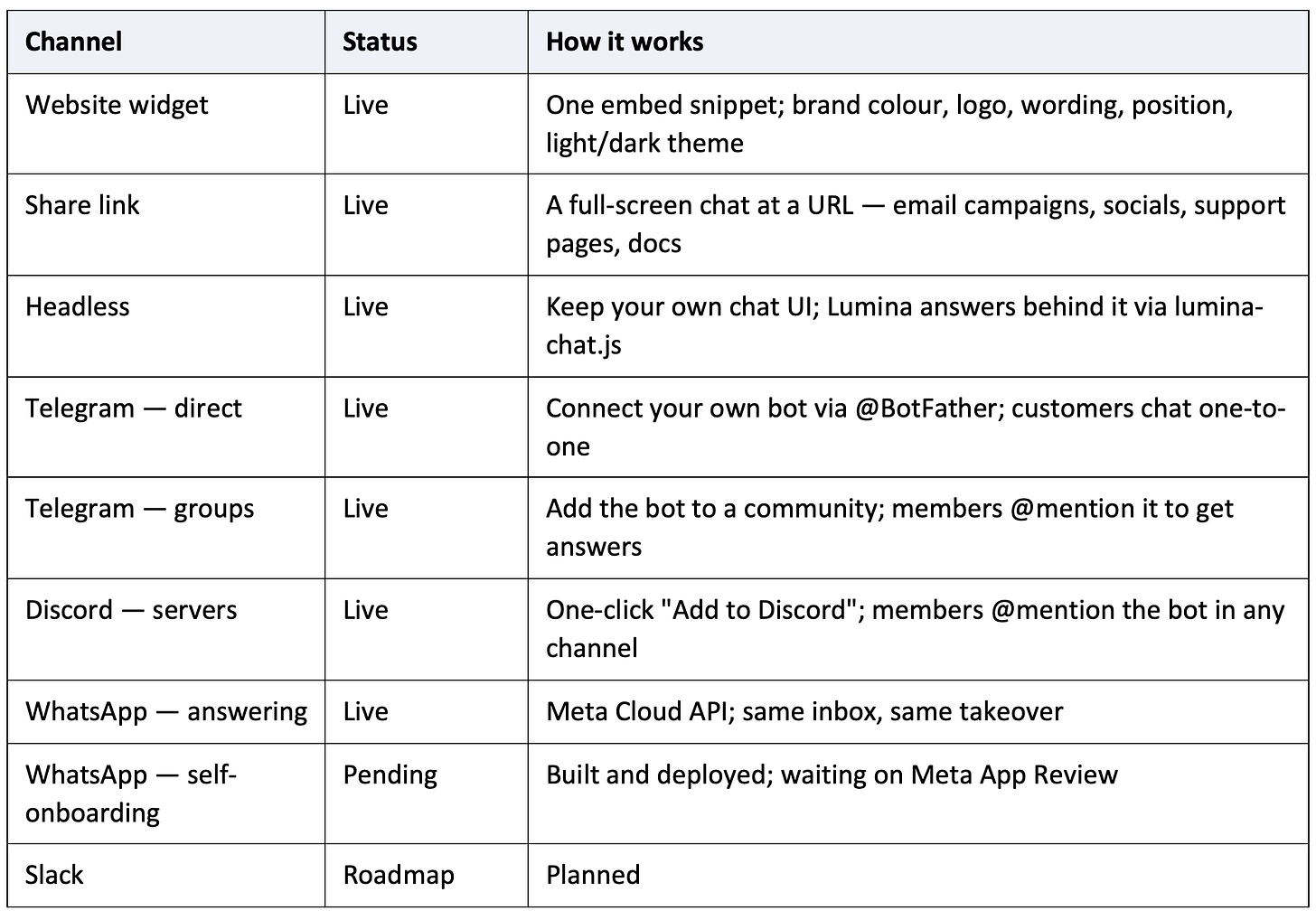
A few design decisions inside that table are worth naming. Discord runs on one shared Lumina bot with a two-step OAuth install, which means no client ever has to create or hand over a bot token — Discord grants server access, not a credential. Telegram went the other way, connect-your-own-bot, because the owner should hold their own brand identity there. On Discord the assistant can never ping @everyone or a role, even if a document contains that text. In busy group threads the assistant is told who asked what, so it does not mix up two members’ questions.
The first Gen-2 feature I built was the Google Calendar integration, and it set the tone for everything after it. Connect a calendar and the assistant answers availability questions from your real schedule, on every channel.
The design constraint I set was to request the least possible access. Lumina uses the freebusy scope only. It receives busy and free time intervals — never event titles, never attendees, never locations, never descriptions. Google’s free/busy data structurally cannot contain them. The owner sets business hours per weekday with up to four ranges a day, a timezone, a look-ahead window of 7 to 31 days (default 14), and a minimum slot length. Derived availability is held transiently for a couple of minutes in memory; the refresh token is encrypted at rest and revoked at Google on disconnect.
And it does not book. It reports availability and reminds the visitor that the slot is indicative and to confirm directly. Actual appointment creation needs a write-level permission and a much heavier confirmation flow, and I would rather surface the business’s existing booking link alongside real availability than request more access than the feature needs. Calendar is also fail-soft by design: if Google is briefly unreachable, the assistant simply answers from the knowledge base as usual. A channel never breaks because of an enhancement.
In Gen-1, everything you wanted to control you wrote into one free-text persona box. Gen-2 breaks the common instructions out into their own controls, because “always answer in German” buried in paragraph four of a persona is a fragile way to run a business.
• Persona and rules — up to 8,000 characters (four times the Gen-1 limit) with a live countdown, and four starting presets: customer support, sales assistant, booking assistant, subject expert.
• Answer length — short, standard or detailed. Short is two or three sentences and is usually right for a support widget.
• Reply language — match the customer, or always one named language.
• When it doesn’t know — the assistant never invents an answer; this box is what it says instead, in your words. The right place for a phone number or a next step.
• Creativity — lower is more repeatable, higher more varied in wording.
Everything you change is a draft. The Playground preview uses your draft so you can test it; your live assistant keeps serving the last saved version until you press Save. Your customers see no change at all until you decide they should.
One security note that generalises: the reply-language field is typed rather than picked from a list, and it is interpolated into the system instruction — which makes it a prompt-injection surface. The rule we apply to any such field is to strip the value to the shape it can legitimately take rather than blocklisting bad strings. A language name is letters, spaces, hyphens and apostrophes, capped at 40 characters. No newline or colon survives to end our sentence and start a new instruction. The persona box is the owner’s sanctioned free-text channel and is deliberately not treated that way; every new field that reaches the prompt is.
Every conversation from every channel lands in one inbox, newest first, refreshing itself every few seconds. Click any one to read the full transcript. In group threads each message is labelled with who sent it.
• Take over — the AI pauses for that one thread only. You type; the reply is delivered over the same channel the customer has been using. Your replies are labelled “You”, the assistant’s “Assistant”. Hand back and the AI resumes.
• The 🙋 badge — if a customer asks for a person, the thread is flagged. It is a heads-up, not an auto-takeover; the AI keeps answering until you choose to step in. There is a soft ceiling on how long a single conversation runs — around 25 exchanges — after which the assistant proposes connecting the person to a human rather than looping indefinitely.
• Email alerts — one checkbox and an escalation emails you the channel, the customer, the last few messages and a link straight into the thread.
• Your own replies are free — only the AI’s automatic replies count against the monthly allowance.
• Filters and search — search what the customer said (not what the assistant said, which would match everything), filter by channel, status and date. Every active filter shows as a removable chip, because the commonest confusion is forgetting a filter is on.
Two honest constraints. Website and share-link conversations cannot be taken over, because the visitor is anonymous and unreachable once the tab closes — and those conversations are auto-deleted after 90 days, along with anything derived from them. And WhatsApp allows free-form business replies only within 24 hours of the customer’s last message; past that Lumina refuses the send and tells you why rather than pretending it went through.
This is the feature I am most pleased with, because it closes a loop rather than adding a screen. A background pass reads each conversation once, shortly after it happens, and writes a one-line summary, a topic, an intent and a sentiment. Insights turns that into charts over 7, 30 or 90 days: how busy you are and on which channels, your top topics in your customers’ own vocabulary, what they wanted across eight fixed categories, how often someone asked for a human, and when messages actually arrive.
Three design decisions carry the whole thing:
1. Everything is clickable. “23 people asked about price” → click → those 23 conversations, same dates, with the filter shown as a chip. The URL updates, so a view you check every Monday can be bookmarked or sent to a colleague. It is not a poster; it is a way in.
2. The chart that closes the loop. “Worth adding to your knowledge base” surfaces the topics where customers most often ended up asking for a person or left unhappy, with a button straight into Knowledge. Analytics → better knowledge base → better assistant → fewer people needing you. That is the entire product in one card.
3. It says what it does not know. If only some conversations have been read, it says “6 of 8” rather than charting six as if they were everything. A number that quietly lies is worse than no number.
On top of the charts sits a plain-language question box: “what did people complain about last week?”, “why did three people ask to speak to a person?” It answers in a sentence or two and shows the conversations it based that on, each one clickable, and it states its basis — “based on 312 conversations, 1 July to 27 July”. It reads the short summaries, never your customers’ full transcripts. Looking at the charts costs nothing; only the question box uses a message, and it says so before you click, refunds it if generation fails, and does not charge you at all if there was nothing to analyse.
Under the hood this is where multi-tenancy gets serious. Batches are grouped per owner, so one tenant’s customer text can never influence another tenant’s results. Conversations are presented to the model positionally — no thread id, integration id or uid ever goes in front of the model. Everything the model returns is validated strip-to-shape before storage, because the topic field is both rendered in a browser and re-fed into a later prompt.
One thing I disclose rather than bury: this background analysis runs for every account and there is no per-account opt-out today. It introduces no new recipient, no new data category and no new retention — it inherits the conversation’s own expiry — but it is a new purpose, and that belongs in the client’s own records.
The single largest structural change in Gen-2 is invisible. For Lumina’s entire life, “who is holding the keyboard” and “whose data is being worked on” were the same value — the Google account you signed in with. Team members and supervised support access both require those to be two values. So the work was not building an invitation screen; it was separating those two ideas everywhere they had been assumed to be one, without changing anything for the accounts already running. It shipped as five deliberately separate deploys, each re-verified live against production before the next one started.
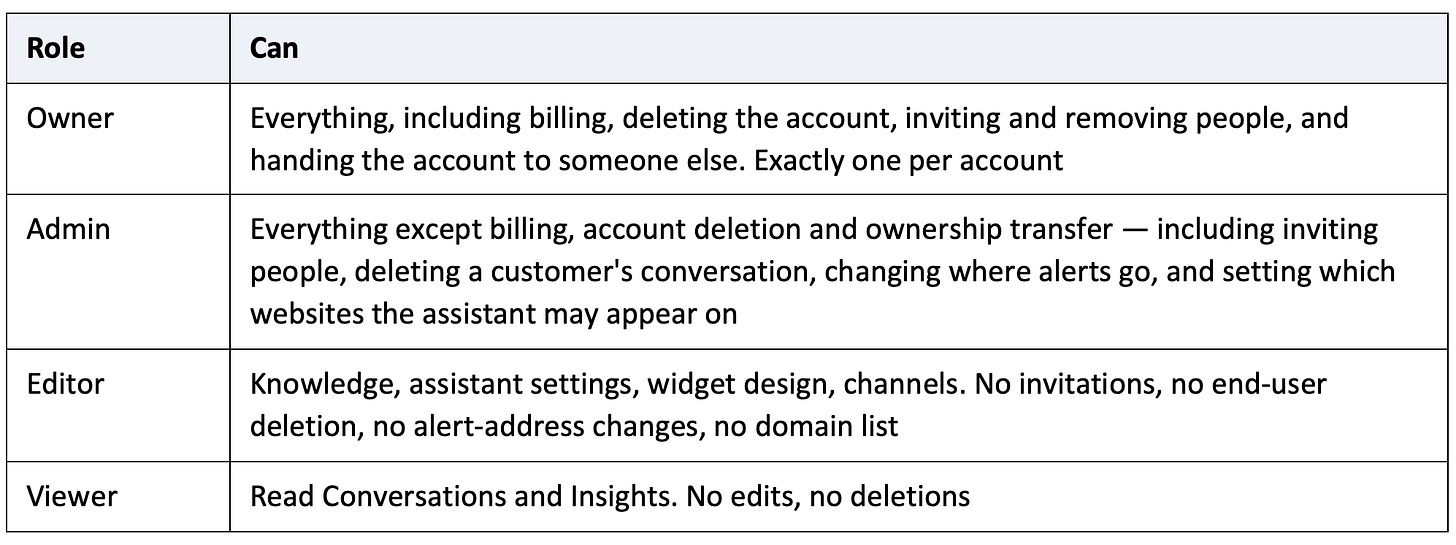
Roles are enforced in the database rules as well as in the API, so a viewer cannot write by calling the API directly instead of using the interface. We do not email an invitation link — a link in an inbox is a bearer credential that forwards, persists and works for whoever clicks it. Because every sign-in is Google, we match the invitation to the email address Google itself has verified. Nothing to leak, nothing to expire.
When a client asks us to help set something up, we work inside their account rather than holding their password. A session is issued only when all of the following hold: the requester is a Lumina administrator; an active, unexpired grant exists on the account which the client can read and revoke at any moment; the session carries a server-enforced expiry of at most 60 minutes, never beyond the grant; and the audit record is written before the credential is issued. If we cannot record that staff entered an account, they do not enter it.
What a support session cannot do is refused by the server, not by hiding buttons — the session holds a real credential and could otherwise call the API directly. It cannot delete the account, start a checkout, open the billing portal, pull the data export, delete or download a conversation, regenerate the widget token, change the email address or the alert address, add or remove team members, or extend its own grant. Every refusal is recorded and attributed by name. Test messages sent during a session are recorded as support and never touch the client’s allowance.
• Domain allowlist — surfaced as “Where your assistant can appear”. Matching is on the Origin/Referer host, exact or subdomain. It bounds a lifted token pasted onto another website; it is browser-enforced, not cryptographic, and we say so. It deliberately does not auto-exempt our own host, because that would leave every share link as a bypass with a friendly name.
• Encryption of integration credentials — AES-256-GCM at rest; bot tokens never reach a browser or another tenant.
• Rate limiting — per-token and per-visitor buckets, plus IP limits on the public endpoints and monthly quota enforcement inside the same transaction that reserves the quota, so the hottest document in the system cannot switch off its own protection under load.
• Signature verification — WhatsApp deliveries from Meta are cryptographically checked, routed by the business number they arrived on, and de-duplicated, so Meta’s automatic retries can never produce two answers to one question.
• A neutral error vocabulary — the headless client resolves rather than rejects on backend refusals, returning one neutral notice. Otherwise an integrator writing catch(e){show(e.message)} would print the account owner’s billing state onto their own customer’s website.
• Secrets in Secret Manager — never in code, with a documented rotation procedure.
Gen-2 rebuilt the internal dashboard as five tabs: Overview, Users, Enterprise Billing, Payments and Team. Overview shows KPIs with a month picker, plan mix and message trends. Users is the management hub where every per-account action lives. Enterprise Billing produces per-account monthly message usage for invoicing, with CSV export. Internal roles are Admin and Accounting (read-only), and — deliberately — holding a Lumina staff role never grants anything inside a customer’s account. The two role systems are completely separate.
Approximations are labelled in the interface rather than smoothed over: overview revenue is drawn from the most recent invoices and is a lower bound in heavy months; the twelve-month trend comes from stored counters and is approximate. Enterprise Billing figures are reconciled and are what we invoice from.
There are currently two plans open: Free, and Enterprise. Enterprise means you talk to us and we onboard together. We can support small, medium or large companies without difficulty.
The Stripe subscription tiers are built and working, and they are deliberately closed. The reason is regulatory rather than technical: automated subscription billing under current Slovenian tax rules is genuinely hard to get right, and I would rather sell nothing than invoice incorrectly. When that clarifies, self-serve comes back on. Until then, enterprise accounts are billed monthly against reconciled message counts. Seats follow the plan: Free is a single seat, paid tiers three, Enterprise unlimited.
This is the part I would have wanted to read a year ago.
Gen-1: Augment Code in VS Code, one agent, one conversation. Gen-2: Claude Code, with orchestration.
The main agent — the one I actually talk to — was Opus 5. It dispatched sub-agents and worker agents according to the task at hand, then audited the result. Every code change went through two audits before merge. At every significant phase boundary, documentation was regenerated alongside the code.
The model mix, honestly reported: roughly 50% of Gen-2 was built with Opus 4.8 plus a small amount of Fable (small because it kept routing me down to Opus on restrictions), and roughly 40% with Opus 5. I used the latest Codex models for independent audit passes — a second opinion from a different family is worth more than a third opinion from the same one.
Starting a project on one model generation and finishing it on the next is an unusually clean natural experiment, because the context, the documentation and the specs were identical across the transition. Everything was in sync with the latest deployment. Only the model changed.
Opus 4.8 is a genuinely excellent coding model. Opus 5 is a different category. Three differences stood out:
1. It self-corrects. If it goes wrong on a specific line, it notices and fixes it, without me stepping in. I had close to no issues across the entire Opus 5 portion of the build.
2. It holds the bigger picture. It behaves as though it knows what it is supposed to be doing, not merely what the current instruction says.
3. It can actually use a browser. This one is underrated. Opus 4.8 struggled with browser control. Opus 5 scrolls, navigates and inspects a running app efficiently — and when you are building software, most of your real defects live in the seam between a backend change and the frontend that has to reflect it. A model that can open the app in production and check a few things gets vastly better context than one working from a screenshot I pasted in.
If I had tried to build Gen-2 in December 2025, I think it would have been close to impossible. Not hard — impossible.
Instead it took one month, working at least twelve hours a day. As I write this, the repository sits at 861 commits. That is not remarkable for an application in general; it is remarkable for an application of this complexity built in that window.
I have said this twice already and I will say it once more because it is the load-bearing habit: I updated the documentation at every significant phase, not at milestones and not at the end.
The new capability in this run was GitBook’s MCP server. I connected Claude Code to it, which meant that at every stage the public documentation at docs.luminawidget.xyz was updated automatically as part of the build. The docs stopped being a downstream chore and became a build artifact. That is a genuinely new thing and I do not think enough people have noticed it yet.
It also creates a discipline worth naming: when documentation is published automatically, stale documentation becomes a live bug rather than a cosmetic one. Our own assistant answers prospects from our own documents. During Gen-2 we found a case where a security statement had been corrected in code but not in a document, and the assistant was answering from the stale version. That is the failure mode that makes auto-synced documentation not a convenience but a control.
Gen-2 got a new visual identity (luminawidget.xyz), and I built it with Claude Design. The experience was genuinely pleasant, which is not a word I use about design tooling often.
The order mattered. First the design system — colours, type, spacing, the tokens. Then the new design for the app. Then the admin dashboard. Then the marketing website. Two days, end to end. I have spent months on a product page in a previous life. That is the compression, in one anecdote.
The result on the app side is a properly polished product: light, dark and auto themes with four text sizes remembered per user across devices, an installable web app, notification design that is consistent, transitions that are smooth, screens that load fast. It is simply a pleasure to be inside, which is not a vanity concern — it is the difference between a tool people use and a tool people abandon.
None of the above would have been possible without the workflow, so this is the section to steal from. I developed this method roughly two years ago, when context windows were tiny and losing state between sessions was catastrophic. The windows got enormous. The method got more valuable, not less.
Context is king. Your job is not to write code. Your job is to maintain context across sessions, across agents, and across models.
You build nothing. Nothing at all. You research the problem, the constraints, the existing state, the regulations, the third-party APIs — and you write it down as foundational markdown files.
This is where Lumina started, and those first foundational files are the direct ancestors of the documentation corpus the project runs on today. They were not throwaway planning documents; they were the seed of the permanent record. Skipping this phase feels fast and is the single most expensive decision available to you.
Now you build, against the foundation. The agent is not inferring what you meant; it is reading what you decided. Every phase that completes updates the documentation as part of the phase, not after it.
Audit, test, deploy, verify against production rather than trusting the deployment tool’s output. Two of our five enterprise-access deploys hit Google’s own quota and finished without printing a success message despite having actually worked. We found that by checking the live services. “It deployed cleanly” would have been the easier sentence and not the true one.
On a project this size you reach a million-token context window remarkably fast. When you do, you start a new session — and the new agent knows nothing about the last state. That is where most people lose days.
My rule is simple and I follow it without exception:
4. Instruct the agent, from the start of every session, that it will be expected to produce a handoff file.
5. Watch the context window continuously.
6. At 80% — around 800,000 tokens on the current Opus models — stop. Do not push to 95%. Stop.
7. Have the agent write the handoff file: current state, what was done, what is in flight, what is next, what to be careful about.
8. Start a new session with the handoff file plus the relevant documentation.
The handoff file is what lets you cross not only from session to session, but from model to model and from vendor to vendor. It is the reason I could start a build on Opus 4.8 and finish it on Opus 5 without losing a day of momentum. It is the most valuable piece of practical advice in this article.
• Research before you build. Write markdown, not code, for the first stretch.
• Keep documentation current with every phase. Treat it as source, not as output.
• Wire your documentation platform into your agent (MCP) so publication is automatic.
• Use one orchestrating agent and let it dispatch specialists. Do not micromanage the workers.
• Audit with a different model family than the one that wrote the code.
• Let the model use the browser against the running app. Screenshots are a lossy substitute.
• Stop at 80% context. Write the handoff. Start fresh.
• Verify deploys against production, not against the deploy log.
• When you find that a document contradicts the code, fix the document the same day. Stale documentation in an AI-assisted project is not untidy, it is a defect that propagates.
• On-premise deployment — the ability to run local LLMs powering Lumina, so nothing leaves the building. This is the most-requested enterprise capability and it is next.
• Storage of your choosing — local or cloud, according to the enterprise’s own policy rather than ours.
• WhatsApp self-onboarding — the code is deployed; this is a switch, not a build, the moment Meta approves.
• Slack — on the roadmap.
• Booking links alongside availability — most of the practical value of booking without requesting write access to a calendar.
• Lead capture — names and contacts when a customer shows intent, with the transcript attached.
• Legal review — our DPA, privacy policy and AI transparency notice are drafted in-house against the relevant articles and are awaiting review by qualified EU counsel. We describe them as drafts because they are drafts.
The thread running through all of this — the architecture, the residency migration, the erasure receipts, the refusal to request calendar permissions we do not need — is one idea: a business should be able to trust what its assistant tells its customers, and should never have to become an AI company to get there.
The journey from Gen-1 to Gen-2 is, incidentally, a very clear window onto the progress of AI coding agents over seven months. Gen-1 was one agent, one context window, and a simple product built well. Gen-2 is an orchestra, a million tokens of managed context, and a platform I would put in front of a compliance officer. The gap between those two things is not effort. I worked hard both times. The gap is capability — theirs and, because of the workflow, mine.
The tools got dramatically better. What did not change, and what I do not expect to change, is that context is still king. Maintain it deliberately, hand it off carefully, write it down as you go — and the models will do the rest of the work astonishingly well.
Lumina services are offered by Lighthouse Group Ltd. (Skupina Svetilnik d.o.o.), Ljubljana, Slovenia. Documentation: docs.luminawidget.xyz
Originally published on Substack and Medium; a summary is on talirezun.com.
By Dr. Tali Režun · From Lab to Life · Essay · 31 July 2026