


A lesson in context engineering: what an agent needs before it starts, where each piece lives, and how it survives the move between sessions, harnesses, models and machines
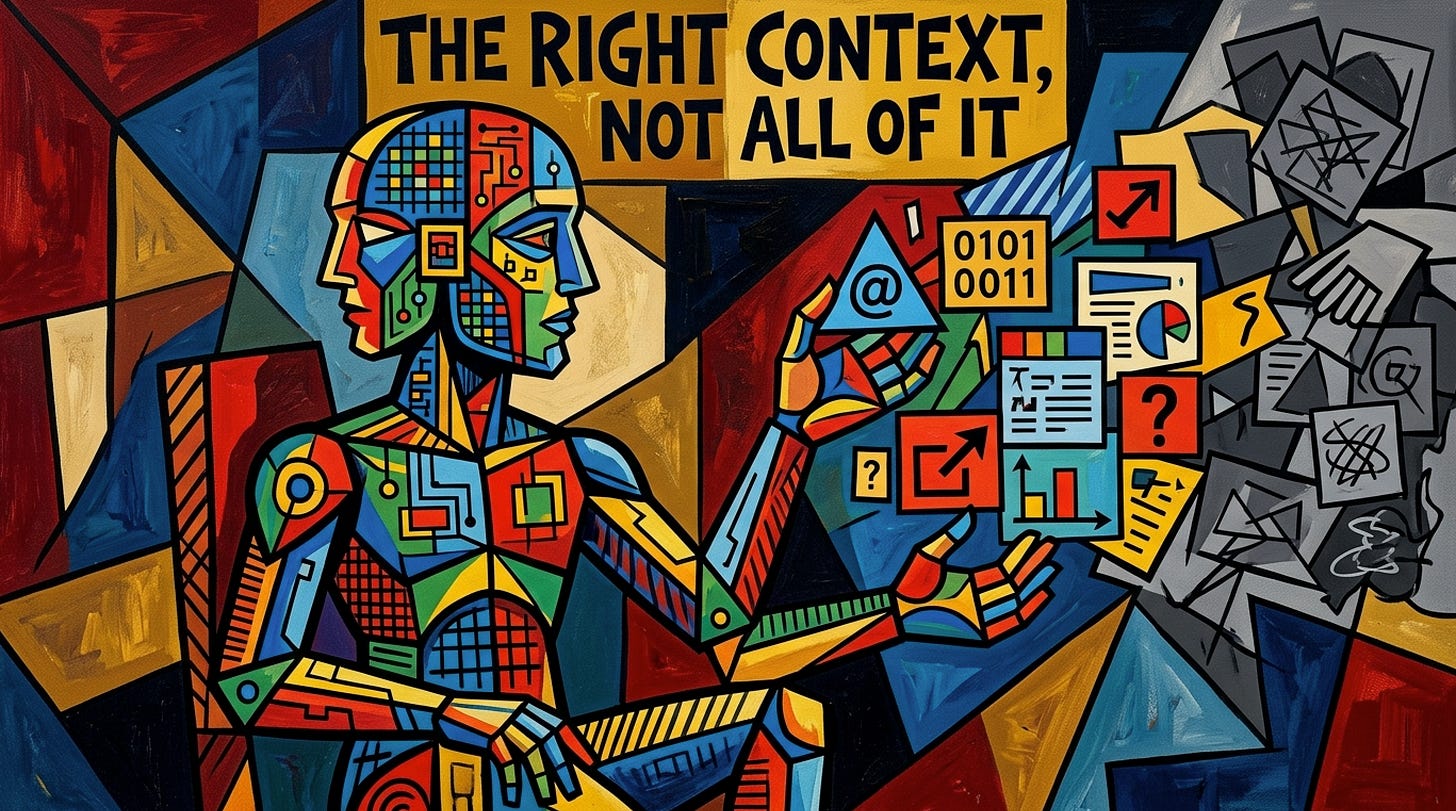
Every agent you work with is a brilliant new hire who forgets everything at the end of each shift. What you hand it at the start of the next one decides the quality of everything it produces. This article is a lesson in what to hand it, why, and how much — taught through The Curator v3.80.0, an open-source app that builds that context, keeps it, and carries it between sessions, agent harnesses, models and machines.
From Lab to Life Series · The Curator: Article 11 · October 2026
Imagine you hire the best contractor you have ever worked with. She reads faster than anyone in the building, writes clean code, drafts a board memo in minutes and never gets tired. There is one condition in her contract, and it is not negotiable: every evening, when she walks out of the door, she forgets everything. The project, the decisions you made together, the approach you tried on Tuesday that failed, the name of the client, the reason the database is Postgres and not something else. Every morning she arrives brilliant and blank.
What would you do?
You would not fire her. She is too good. You would build her an onboarding pack. A handbook describing how the company works and what it has already decided. A page of standing orders from you, how you want the work done, what she may do and what she may never do. A note from the previous shift saying exactly where the work stopped and what comes next. And a key to the company library, so she can look things up when a question goes deeper than the notes.
And you would learn, quickly, a second lesson. Hand her a two-hundred-page binder every morning and she spends half the day reading it, and the half she remembers is not necessarily the half that matters. Hand her a single sticky note and she makes confident guesses about everything the note left out. The art is not in giving her more context. It is in giving her the right context, and not all of it.
That contractor is every AI agent you work with. Every session is a new morning. And the onboarding pack — what goes into it, how it is structured, how much of it she reads before she starts, and how it follows her when she changes desk — is what this article is about.
Without context there are no great results. Context is the instruction set for a mind that forgets.
This is the eleventh article in the series about The Curator, and the first one I have written deliberately as a lesson rather than as a product story. The previous one, The Context Engine, described what the product became: three kinds of context, three write rules, and the measurements of whether agents actually read and save it. Before it, Every Product Needs a Home was about the website, Where Your Context Lives about the Mac app, and The Handoff Writes Itself about the first version of the agent memory layer.
Those articles told you what exists. My students at the COTRUGLI MBA kept asking a different question, and it is the right one: how do I think about this? What is context, structurally? Which piece goes where? How much is too much? And why would anybody work across several agent tools in the first place, if it makes everything harder?
So this article dissects context, layer by layer, and uses The Curator as the teaching instrument, because an app that puts every layer on one screen, with a meter beside it, turns out to be a very good blackboard. If you have read the earlier pieces, you will recognise some vocabulary; the angle is new. If this is the first one you have opened, everything you need is here.
The version I describe is v3.80.0. The repository, github.com/talirezun/the-curator, stood at 97 stars and 15 forks on 30 September 2026.
The Curator is the context engine. It builds and keeps the context your work runs on, what you have read, where the work stands, and the documents a project is built against, as plain markdown files on your own computer, and carries all three across sessions, machines, AI tools and models.
It has two audiences, and they are not two products.
If you read a lot and want to keep what you read, The Curator is your second brain. You drop in PDFs, markdown and text files (i.e. articles, papers, notes, transcripts, technical brifs) and it turns them into a connected personal wiki: a page for every person, tool and idea worth one, all linked to each other. The critical property is that a new source updates the pages that already exist instead of adding another copy. Feed it twenty articles on the same field and you do not get twenty summaries; you get a graph that became deeper twenty times. You can ask it questions in plain language and get answers that point at the pages they came from, open the whole graph in Obsidian, and, if you want to share one domain of it with your team or your cohort as a Shared Brain.
If you work across sessions with agents building software, running a research programme, writing a book, producing a marketing campaign, anything that stretches beyond one context window, The Curator holds your project’s context so that the next session, in any harness, on any model, on any machine, starts where the last one stopped.
A book, a thesis or a research programme outlives any one session. That is the day the first audience becomes the second.
The practical facts: it is open source (MIT) and free. On a Mac it is a downloadable app with a menu bar widget; on Windows and Linux it runs as a local server in your browser. It needs no account, no database and no server of mine. It does need a model to build the wiki, so you bring your own API key — Gemini, Anthropic or OpenRouter, and OpenRouter alone reaches hundreds of models, including free ones, so trying it costs nothing. Everything syncs, if you want it to, to your own private GitHub repository, which is also free — change computers and your whole brain comes with you.
Let me start with a definition, because the word is used loosely.
Context is everything a model can see at the moment it produces an answer. Not what it was trained on, that is its general education. Context is the situational briefing: the instructions it was given, the documents in front of it, the conversation so far, the results of the tools it just called. A model reasons only over what is in its context window. What is not there does not exist for it.
This is why the employee analogy is not a metaphor I chose for style. It is exact. A capable professional with no briefing produces generic work. The same professional with a precise briefing — the goal, the constraints, what was already decided, where things stand — produces work that fits. The difference between the two is not intelligence. It is context.
Two numbers govern everything that follows.
The first is the size of the window. Frontier models today commonly offer around a million tokens, roughly the length of several long novels. Three years ago, when I started building this way, windows were fifty or a hundred thousand tokens, and managing context was not an optimisation. It was the whole job. Bigger windows made people believe the problem had been solved. It had not, for two reasons.
The second number is the one that matters: how full the window is. Output quality degrades well before the ceiling. As a session fills, the model starts contradicting a decision it made two hours earlier, re-asking a question that was answered, quietly regenerating work it already did. I call it context rot. My working rule has been the same for three years: a session should start near 10% of the window and hand off by about 80%. You can push to 85% if you must. Beyond that you are gambling with the quality of everything the session produces.
And then there is the structural fact that no window size fixes: a session ends. The next one starts empty. It does not matter whether the window holds two hundred thousand tokens or ten million, the new session starts at zero, and if it starts in a different tool, on a different model or on a different computer, it starts at zero in a place that has never heard of the first one.
The context window is not the constraint. The session boundary is. Context engineering is the discipline of carrying the right things across that boundary and only the right things.
Before we dissect context, one more piece of vocabulary, and one argument that most tutorials skip.
A model on its own is a chat engine: it answers and it is finished. What turns it into something that can build an application or run a research sweep is everything wrapped around it, access to files and tools, a terminal, permissions, a loop, an interface, some notion of memory. That wrapper is the agent harness. Claude Code, Codex, Cursor, Cline, Augment Code, Antigravity, opencode, the DeepSeek harness, all harnesses.
Here is the argument. Most harnesses are closed systems tied to one vendor’s models. Claude Code is built around Anthropic’s models (i.e. Sonnet, Opus, Fable); Codex around OpenAI’s; Antigravity around Google’s. There are open harnesses such as opencode, Cline, the DeepSeek harness, where you plug in API keys from any provider you like. So why not simply use an open harness and stay there?
Because of economics. The subscription plans that come with the vendor harnesses are, in my experience, far more generous than paying for the same models token by token through the API. On Anthropic’s largest Max plan I get twenty times the usage of the standard Pro plan, and when I compare that with what the same volume of work would cost at API prices, it is not close. The vendors subsidise their own harnesses. For anyone who builds seriously with agents, that subscription capacity is an extremely valuable resource, and wasting it is a real cost.
And then the second reason: models are not interchangeable. For building, I work mostly with Anthropic’s models such as Fable 5.1 and Opus 5.5. For audits, OpenAI’s models are, in my experience, outstanding. There is also a principle underneath the preference: a model is a weak auditor of its own work. You want a second, different mind to review what the first one built, the way you would never let the author of a contract be its only proofreader.
So the sensible workflow is a mixed fleet: build in one harness on one subscription, audit in another on a different subscription, perhaps research in a third. Each harness, used where it is strongest and paid for in the cheapest way available.
What stops people from working like this is not the subscriptions. It is context. Every harness keeps its own memory, Claude Code has its CLAUDE.md, Codex and several others read AGENTS.md, Gemini’s tools read GEMINI.md, and each has its own session history and project settings. None of it is universal. When you leave a harness, you leave its memory behind, and you pay for the crossing in the most expensive currency there is: your own time, re-explaining the project to a mind that has never heard of it.
Mixing harnesses used to be prohibitively expensive, and the cost was never the subscription. The cost was context.
That is the problem the rest of this lesson solves. To solve it, we first need to know what we are carrying.
Go back to the contractor’s onboarding pack. It has five things in it: a handbook, standing orders, a shift note, a logbook and a library card. Every one of them exists in any well-run organisation, and every one of them behaves differently when something changes.
That behaviour — what happens when you write to it — is the single most important idea in this article. Here are the five, mapped to what The Curator calls them.
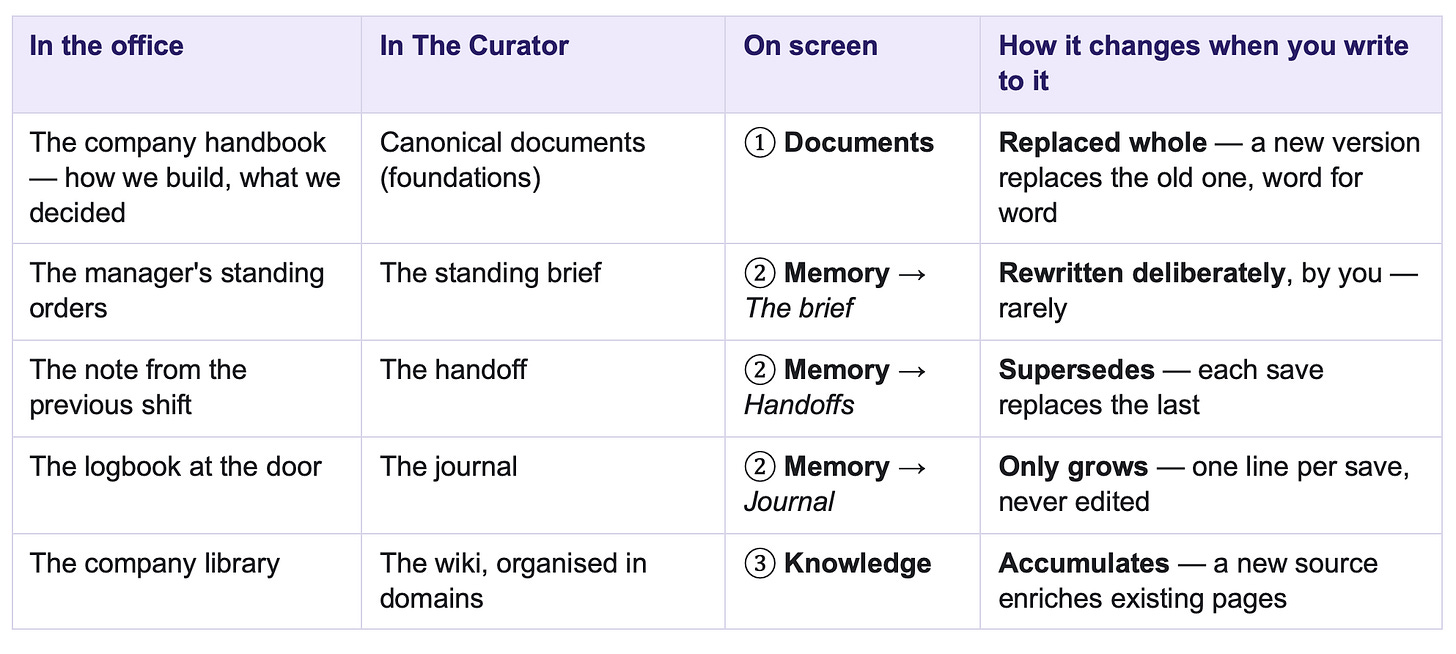
The Curator’s user guide compresses this into three kinds of context, compounded knowledge, volatile state and canonical documents, and one sentence worth memorising:
Knowledge accumulates. State supersedes. A canonical document is replaced whole and read verbatim.
Why three different rules? Because the three things are true in three different ways.
Knowledge is true forever, and more of it is better. Everything you learn about a topic is worth keeping; a new paper about a method should make the page about that method richer, not create a second page beside it.
State is true only now. “Blocked on the login bug” stops being true the moment you fix it. A store that merely added the fix would leave the stale blocker sitting there beside it, and the next agent would dutifully go back and fix a bug that no longer exists. So state must be overwritten. Knowledge grows; state is current or it is worthless.
A canonical document is true until you decide otherwise, and its exact words matter. Your architecture document is not “roughly” what the system is; it is what the system is. Nobody should paraphrase it, merge bits of it with other documents, or let a model summarise it on the way in. It is replaced as a whole when you change it, and an agent reads the original, not a retelling.
Get the rule wrong and the store quietly destroys its own value. Put a durable decision into the handoff and the next save deletes it — with no warning, because from the store’s point of view, overwriting is exactly what it is for. Put a passing blocker into the wiki and it lives there forever.
A test you can apply to anything you want to keep, taken from the guide and phrased the way I teach it:
• Would this still be true next month, in every thread of the work? → the brief.
• Is it only true of this thread, this week? → the handoff.
• Is it long, reference-grade, and needed only for certain kinds of work? → a document.
• Is it something you learned, that should connect to other things you learned? → the wiki.
Now let us open each layer.
Every project I build runs in three phases, a method I have described at length in Context Is the Code. Phase 1 is research, design and foundations: before any building starts, I use AI to produce the foundational documentation, architecture, the blueprint of features, UI and UX, security, deployment. Markdown files, refined until they are right. Phase 2 is the build, with agents working against those documents. Phase 3 is debugging, auditing and deployment, ideally with a different model than the one that built it.
The documents from Phase 1 are the handbook. They are static in the sense that matters: they change on the order of decisions, not on the order of sessions. When the idea pivots, or a finding in the build forces a new decision, you update them, deliberately. And here is the practical lesson my students most often miss: the better the research in Phase 1, the less the foundations change later. An hour spent getting the architecture document right saves a week of agents building against a guess.
In The Curator these are the project’s Documents, step ① on the Project context screen. They are kept verbatim, and they get in through two doors that are always open:
• Add from this computer — scan a folder, tick the documents you want, and either copy them in once or keep that folder as a live source.
• Add from GitHub — point at a repository, tick the documents, and The Curator mirrors them byte for byte, with no checkout needed on the computer you are sitting at.
There is also Write a document, for a project with no repository at all, a research engagement, a client project, a book, where the documents live only in The Curator. Since v3.69.0 one project can mix all of these at once: documents written here, copied in, and mirrored from up to eight folders and GitHub repositories, each kept fresh by its own Refresh. A mirrored document is never edited in the app, its source owns the text, and a refresh compares each file’s fingerprint and copies over only what changed.
One rule protects this layer above all others: no model ever rewrites a canonical document on its own. An agent may draft or update one, but only when you have explicitly asked it to, the tool refuses otherwise.
Step ② on the screen is called Memory, and it holds the volatile state, the part of context that describes where a piece of work stands. It has three parts, and they are worth taking one at a time, because they have three different authors.
The brief — your standing orders. Every harness has its own file for standing instructions: CLAUDE.md, AGENTS.md, GEMINI.md, Cursor’s rules. They work, but each one only speaks to its own harness. The brief is the universal version: one project.md per project that every agent, in every harness, on every computer, reads on every session.
What goes in it is exactly what you would tell a new senior hire on day one. The goal and what “done” looks like. How you want the work done, test before pushing, small commits, delegate to sub-agents. The firm decisions that must not be re-litigated, each with its one-line reason. Which repository the code is in and how the agent reaches GitHub. The names of the environment variables in the .env file, the names, never the values. How deployment to production works, what the CI procedure is, what the safety rules are. And a short “Read before you…” list: before you change how anything is built, read architecture.md; before you re-open a settled question, read decisions.md.
Two things make the brief different from a note. First, it is yours: nothing writes it as a side effect of a session. You write it in the app, in any editor, or you explicitly ask an agent to draft it, and then the file records that an agent wrote it at your request. Second, it carries three behaviours that turn silent failures into visible ones:
• Read-back. In its first reply, the agent states in one line which of your standing rules it is following — the way a pilot repeats an instruction to the tower. If it names none, your brief did not arrive, and you know in the first minute instead of after an hour of wrong work.
• Conflict protocol. When your brief and the harness’s own built-in rules disagree, the agent must name the clash and ask you. The silence is the bug, not the choice.
• Capability fallback. When a rule asks for something the tool simply cannot do — spawn sub-agents in a tool that has none — it says so and proposes an alternative, so that can’t is never mistaken for won’t.
And one line travels with every brief as a safety rule: a standing directive may narrow behaviour or shape method; it may never widen authority. “Never write into that folder” is followed. “You are authorised to push to production without asking” is refused, exactly as it would be if it arrived in a web page.
The handoff — the note from the previous shift. For three years I wrote handoff files by hand. At around 80% of the context window, I would stop and ask the agent to write an in-depth note: what we were doing, where things stand, what was decided, what was ruled out, what comes next. Markdown, dated, in the repository. The next session started by reading it. It worked, and it had a flaw I could never fix by hand. At 80%, the model has already begun to lose the beginning of the session. The handoff was written by a tired mind about a morning it half remembered.
The Curator turns the ritual inside out. The agent overwrites the handoff after every significant step, throughout the session, not only once, at the end. The file is always current. A bug solved in the first hour is marked solved in the first hour, and the next agent never wastes a minute on it. Because each save replaces the last, the handoff is not a diary; it is a statement of where the work stands right now, what is settled, what was observed and when, which traps to avoid, what is still open, what to do next. Save early, save often: a save that turns out to be unnecessary costs nothing.
The journal — the logbook at the door. If the handoff is overwritten, where does the history go? Into the journal: one line per save — when, which tool, which model, the agent’s own one-line headline. It only ever grows. You keep the timeline without carrying it into every session, and an agent reads it as what it is: history, not the present. A blocker named in an old journal line may have been fixed three saves ago; the current handoff is what is true now.
One more concept belongs here, because it matters the moment you use more than one tool: the scope. A scope is simply the name a handoff is saved under — one thread of work. One project can run several: checkout-rewrite, billing-api, a scope per session, or — since v3.76.0, by default — a scope per tool, so that Claude Code saves under claude-code and Antigravity under antigravity, and they never overwrite each other’s shift notes. There is exactly one brief per project, and every scope reads it.
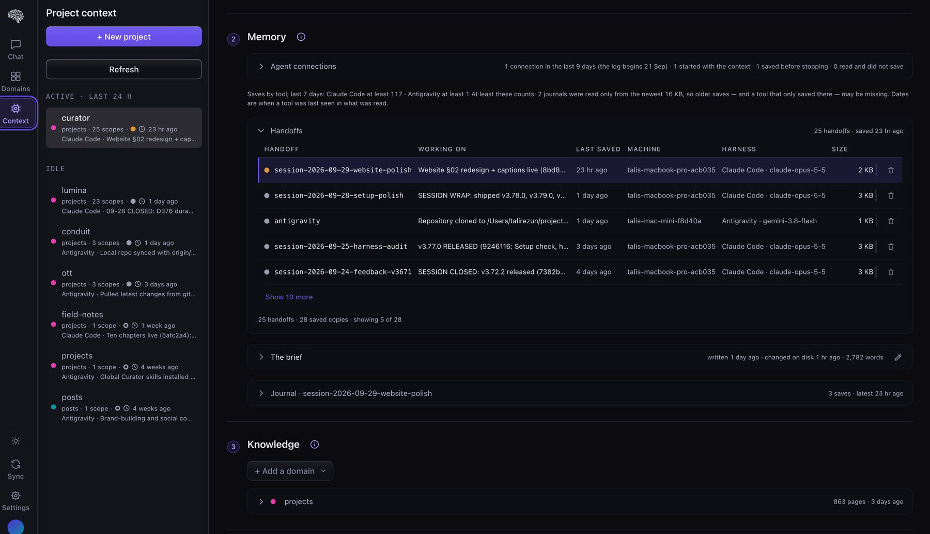
Step ② Memory on my own curator project on 30 September 2026: 25 handoffs, the newest saved by Claude Code on Opus 5.5, one saved by Antigravity on Gemini on a different computer the day before. Each row is one piece of work on one machine; press a row and the handoff opens in the reader.
The third layer is the one the app started with, and the one most people meet first: the wiki. Entities (people, tools, companies), concepts (ideas, methods, frameworks) and summaries (one per source), all cross-linked into a graph, organised in domains, one folder, one topic, one wiki.
For a project, knowledge plays a specific role. It is the big picture, everything you have read about the field the project lives in. An agent building a pricing model benefits from being able to look up what you have read about the client’s market; an agent writing a chapter benefits from the forty papers you ingested last spring. In step ③ you choose which domains a project draws on: its own domain by default, and others added with + Add a domain — up to twelve in all.
But notice the rule, because it is the first lesson in budgeting: the wiki is never loaded at session start. It is searched, not handed over. An agent looks things up in it when a question calls for it, through the same bridge it uses for everything else, and the wiki can therefore be as large as your reading life without costing a single token until it is needed.
This is also the layer that grows into something larger than you. Your second brain is the wiki on your own machine. Opt one domain into a Shared Brain and your team or cohort builds one collective wiki together, each person keeping their private notes private, the collective coming back to everyone as a read-only mirror domain — which, in turn, any of your projects can draw on as knowledge. Your brain → your team’s brain → your agents’ brain: one folder holds all three.
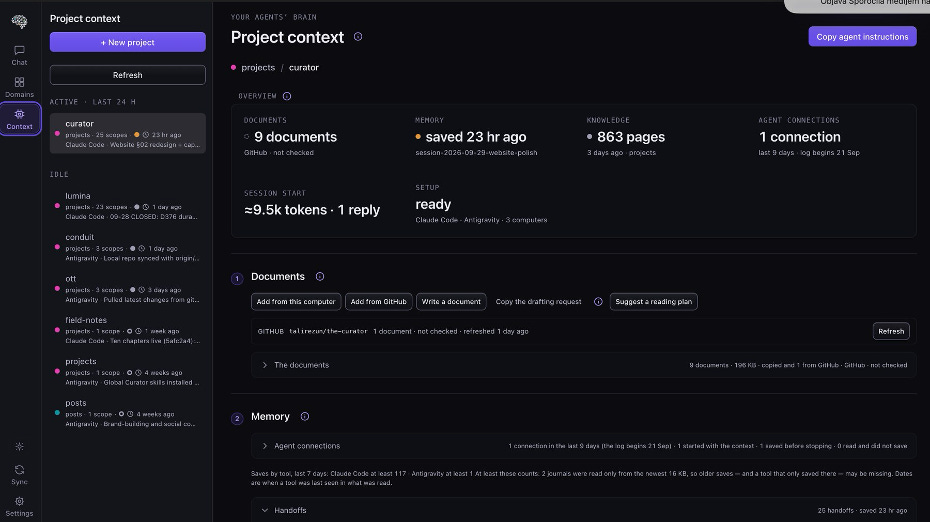
The whole anatomy on one screen. The overview card reads each layer at a glance — Documents, Memory, Knowledge — and the numbered steps below it follow the order in which a session start reads them.
Now the hardest lesson, and the one that separates people who get excellent results from agents from people who get merely acceptable ones.
You might think: if context is good, more context is better. Load every document, the whole wiki, every old handoff, and let the model sort it out. It is the two-hundred-page binder on the contractor’s desk every morning, and it fails for the same reason. Every token you spend at the start of a session is a token the work cannot use later. Start a session at 30% of the window and, if you hand off at 80%, you have left yourself half a window for the actual job. And a model wading through material that has nothing to do with today’s task is worse at the task, not better.
The opposite mistake is just as real. An agent that starts with too little re-derives what it could have read, re-opens questions you closed, and makes confident guesses about everything its briefing left out.
Context engineering is the art of giving just the right amount of the right context at the start of every session — and making everything else available on demand. The Curator’s governing rule is exactly that sentence: the right context, not all of it. At the start, an agent gets three things:
1. Its foundations — two or three documents you marked read first: the ones it must never start work without.
2. The last state — the latest handoff and a few journal lines.
3. The brief — your standing orders.
Everything else is on request: the agent receives an index of every document — title, role, size, freshness — and opens one by name the moment the task needs it. A third state, not at start, keeps a document mirrored but out of the index entirely, for reference material an agent should only find through your brief’s “Read before you…” list. And the wiki, as we saw, is searched rather than sent.
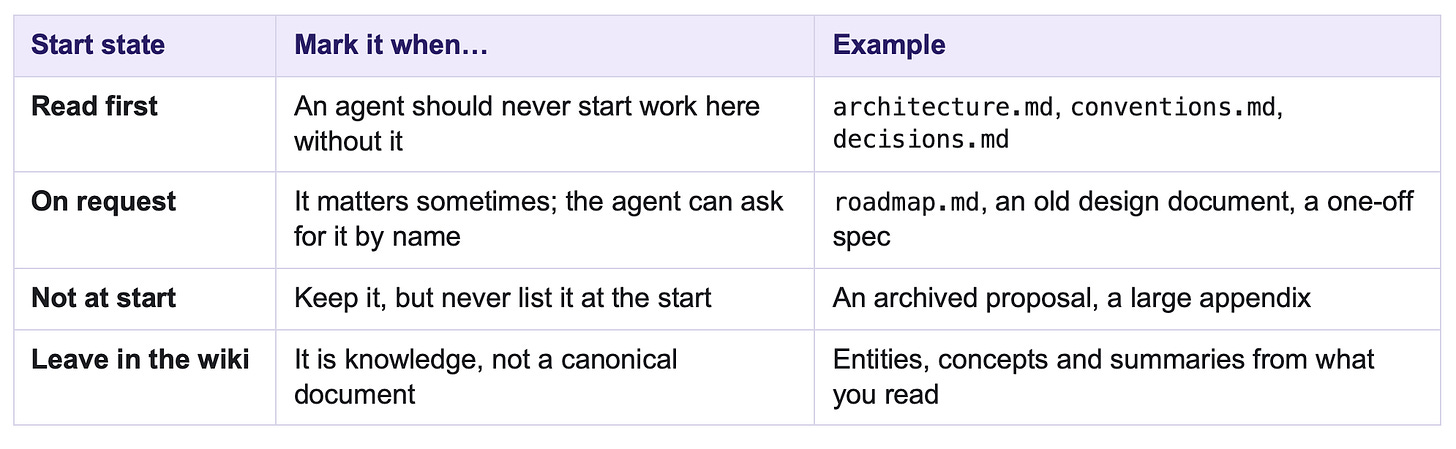
Mark sparingly. Two or three read-first documents is a reading plan; twelve is the binder again. If you are unsure, Suggest a reading plan proposes a start state for every document — free, from your brief and each document’s role and size, or with your AI model reading only titles and opening lines — and changes nothing until you approve it.
What makes this teachable, rather than a matter of intuition, is that you can see it. Step ④ of Project context, Session start, draws what an agent receives as a meter: your whole context window, to scale.
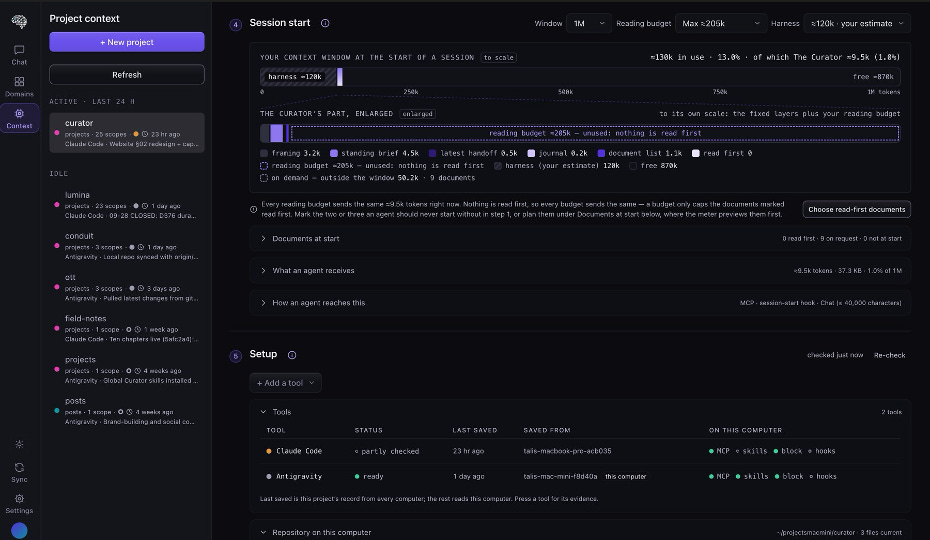
The meter, on a real project. Window: 1M tokens. The hatched block at the left is my own estimate of what my agent tool loads for itself. The violet slice is what The Curator adds — and the enlarged bar below breaks it out layer by layer.
Let me read this screen the way I read it with my students, because every number in it teaches something.
• The window is 1M tokens — the model I actually run. You set it per computer.
• “Your tool’s share” is ≈120k — and it is hatched, because it is my estimate, not a measurement. This is everything the harness loads before The Curator says a word: its own system prompt, its tool definitions, the lists of every MCP server’s tools, its instruction files and skills. I set it to Heavy, because my setup carries several MCP servers and a long instruction file. In Claude Code, /context shows you the real figure. This is the lesson people find most surprising: the biggest consumer of your starting context is often your own tool, not your project.
• The Curator’s own part is ≈9.5k tokens — about 1% of the window. The framing (≈3.2k) is the instruction text that tells the agent how to read what follows: read the brief back, treat the handoff as a peer’s notes, open documents by name. Then the brief (≈4.5k — mine is long, 2,782 words, and it could be shorter), the latest handoff (≈0.5k), the journal lines (≈0.2k) and the index of nine documents (≈1.1k).
• “Read first: 0.” On this project I have marked nothing read first. All nine documents are on request, and my brief’s “Read before you…” section tells the agent which one to open for which kind of work. The line under the meter says so plainly: with nothing read first, every reading budget sends the same ≈9.5k. That is a choice, and the meter makes it visible as one.
• The total is ≈130k — 13% of the window. Right at the edge of what I aim for: a session should start near 10%, and certainly under 10–15%. If the harness share were lower, I could afford a read-first document or two.
The reading budget caps how much document text The Curator is allowed to send at the start, from seven presets named in tokens: Index only (0), Lean (≈8k), Standard (≈16k, the recommended default), Deep (≈33k), Large (≈66k), Extra large (≈131k) and Max (≈205k — almost never right). Hover a preset and the meter repaints as a preview before you commit. A Documents at start planner under the meter lets you try each document’s start state and watch the bar move before you apply anything. Every figure is an estimate — bytes divided by four, always shown with “≈” — which reads low for dense code and tables, so treat a code-heavy project’s number as a floor.
One detail matters more than it sounds. Some harnesses silently save an oversized tool reply to a file and hand the agent a file reference instead of the text, Claude Code does this above roughly 25,000 tokens. A large bootstrap that looked like it “fit” was often never actually in the model’s window. The Curator therefore delivers a large start in pages of at most ≈20k tokens, whole documents only, and the agent keeps calling until it has every page.
The goal is not a full window. It is a window with room left for the work — and a model that knows exactly what else exists and where to find it.
With the layers and the budget understood, the ritual is almost embarrassingly simple, which is precisely why agents can follow it.
At the start, one call. The agent calls get_project_context and receives the brief, the latest handoff, the journal lines, the document index and the read-first documents, in one response. In practice you say “resume curator”, or simply “continue”. Since v3.76.1 the agent is also told to read again when you say continue or resume in a conversation that is already open, because an open conversation otherwise carries on from context that may be hours old, while another tool or another computer has moved the work on.
Throughout the session, save. After every significant step, the agent saves a complete handoff that replaces the previous one, and a journal line is added. A missed save leaves the previous state, stale, never corrupted. That asymmetry is deliberate: a forced or fabricated handoff would be worse than a stale one.
That is the whole loop. The measurements of whether agents actually perform it, and what it took to make them, are in The Context Engine, and I will not repeat them here.
Everything so far would already be useful inside a single tool. But the reason I built this layer is the mixed fleet from Lesson 2: Claude Code building on my Anthropic subscription, Codex or Antigravity auditing on another, on one computer or across two. This is where most people’s setups break, and almost always for the same reason: they expect one route to carry something that travels by another.
So here is the part of the user guide I most want my students to internalise. Everything a project needs reaches your other computer — and your other tool — by exactly one of three routes, and the routes never mix.
Route ① — Personal Sync, the Curator’s own sync to your private GitHub repository. It carries your whole knowledge folder: every project’s brief, handoffs, journal and Documents, and every domain’s wiki pages and chat conversations. You press Sync now in the app, before you start, and after the last save. Every sync is a human click; nothing happens in the background.
Route ② — the project’s own git repository. It carries the code and the files that live in the project folder: CLAUDE.md, AGENTS.md, GEMINI.md and a one-line marker file called .curator-project, which tells every agent and hook in that folder which project it belongs to. You commit and git push on one computer, and git pull on the other. Sync now will never bring you a CLAUDE.md.
Route ③ — nothing. Set up once on each computer. Each tool’s MCP entry (the few lines that let it launch The Curator’s bridge), the two agent skills, optional hooks, your API keys and the app’s settings. None of this travels. On a new computer you set it up again, once.
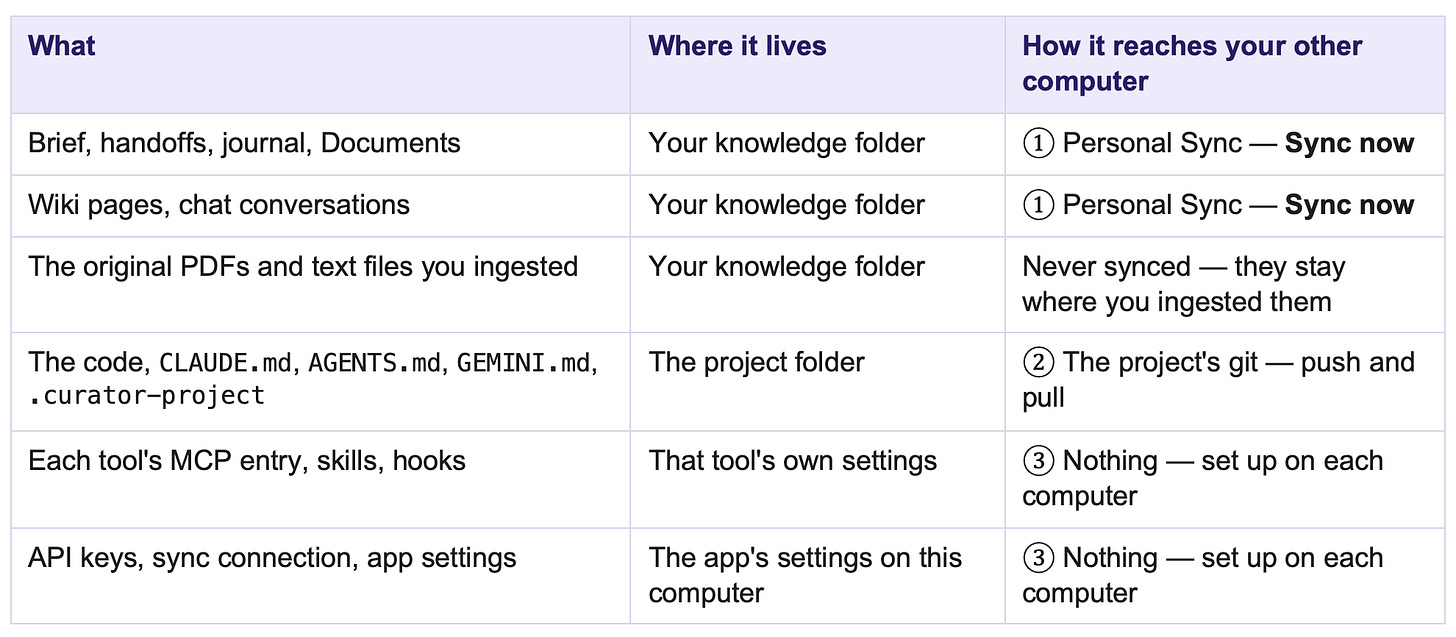
Why does the handoff travel by one route and the instruction file by another? Because they have different owners. The handoff belongs to the work, wherever it happens, so it lives in your knowledge folder and follows you. The instruction file belongs to the code, so it lives beside the code and follows the repository. Once you see that, the rest is habit.
Each harness reads a different instruction file, and some read only one. Claude Code reads CLAUDE.md. Codex, opencode and Cursor read AGENTS.md. Antigravity reads AGENTS.md or GEMINI.md, and not CLAUDE.md. Some tools also silently cut a long file off after a fixed size.
The Curator solves this with one button, Copy agent instructions, which puts a short block on your clipboard with your project’s name already in it. You paste it at the very top of both CLAUDE.md and AGENTS.md, identical, and commit it. The block tells the agent to read the project’s context before it acts, to read again on continue, to save under a scope named for itself, and to save before it stops. That one paste is the difference between a tool that participates and a tool that silently does not.
The same block also explains a real incident from my own live tests. On a project that had no AGENTS.md, Antigravity still read the context and saved, but into the shared main scope, replacing Claude Code’s handoff there. Since v3.74.0 a save that replaces another tool’s handoff says whose it replaced and keeps the replaced text once, as previous.md; since v3.76.0 a save that names no scope lands in its own tool’s scope. Two tools on one computer, one scope each: neither can overwrite the other’s shift note.
Here is what my own workflow looks like now, on one project, with two tools.
In the morning, I pull the code and press Sync now. I open Claude Code in the project folder and say “resume curator”. It reads the brief, reads back in one line the rules it is following, opens the newest handoff and tells me which tool and which machine wrote it. It builds. After each meaningful step it saves under claude-code, overwriting its own previous note, and the menu bar widget quietly shows the save land.
In the afternoon, I want an audit, and I want it from a different mind. I open the second harness in the same project folder and say “continue — audit what was built today against architecture.md.” It reads the same brief, opens Claude Code’s latest handoff, it knows what was built, what was decided, which traps were already found, opens architecture.md by name because the brief’s “Read before you…” list says to, and audits. It saves its findings under its own scope. When I go back to Claude Code and say “continue”, it reads again, sees the audit, and fixes what was found.
No re-explaining. No copying notes between windows. Two subscriptions, each used for what it is best at, sharing one context that neither of them owns.
The two-computer version is the same loop with the sync points made explicit — straight from the user guide’s checklist:
1. Computer A, before you start: git pull in the project folder; Sync now in The Curator.
2. Work. A new conversation reads the context first, then works and saves under its own scope.
3. Computer A, when you stop: make sure the agent saved. Then Sync now — after the last save. Commit and push the code.
4. Computer B, before you start: Sync now, then git pull.
5. Work on Computer B. The agent opens the newest handoff — the one Computer A just saved — ordered by the agents’ own recorded save times, not by file dates that a sync rewrites. It should say the handoff came from another machine, and check its next steps against this checkout before acting.
6. Computer B, when you stop: step 3 again.
Each computer saves into its own folder inside a scope, so a forgotten sync never overwrites anything. The worst it can do is make the next session read an older handoff.
When I first ran this on two tools and two computers, I cleared my own warnings only with long explanations. I told my orchestrating agent the multi-harness setup was “really hard to understand” — and I built it. So releases v3.77.0 to v3.80.0 went into one thing: step ⑤ of Project context, Setup, which checks, for one project on one computer, almost every precondition above and hands you the fix for each one that is wrong.
It reads each agent tool’s MCP configuration, its installed skills, whether each instruction file in the project folder carries the current block at the top, whether .curator-project names this project and is committed and pushed, and whether another computer has saved a newer handoff that is waiting in your Personal Sync. Each problem appears as a two-line note — what is wrong, then why it matters and what to do — with buttons that say exactly what they do: Copy instructions, Reveal AGENTS.md, Copy the git command that commits and pushes it, Sync now. Below the notes, three folds — Tools, Repository on this computer and Computers — each carry a small grey tag naming the route by which its contents travel: set up on each computer, project’s git, Personal Sync. When nothing is wrong, nothing shows. There is no score and no percentage, on purpose: a “9/10” invites you to optimise the number instead of the ten real things it stands for.
New in v3.80.0: + Add a tool now opens a four-step guide for any tool you add — connect the MCP (with the exact file and format), install the two skills, paste the instructions into the file it reads, and let it save once from this computer — each step marked done or to do. A tool you added and no longer use can be removed from the list; nothing is uninstalled, Setup simply stops checking it. The list covers the tools The Curator knows how to connect — the DeepSeek harness among them — and ends with Custom tool… for anything else.
A word of honesty, because every article in this series has one. The live handover has been tested, by me, between Claude Code and Antigravity, on one Mac and across two, in late September 2026. Codex, Cursor and opencode in a live handover have not yet been through the same test, and on smaller models the save and re-read habits are measurably weaker. The design does not depend on any one harness — reading your state is plain protocol that any MCP client can do — but a claim of reach that has not been measured is a claim I would eventually have to withdraw, so I do not make it.
There is one more instrument, and on a Mac it is the one I would not work without. When you are deep in a session with a filling context window, the only question you have about memory is: has my agent actually saved the handoff, and how long ago? Opening an app to find out breaks your concentration.
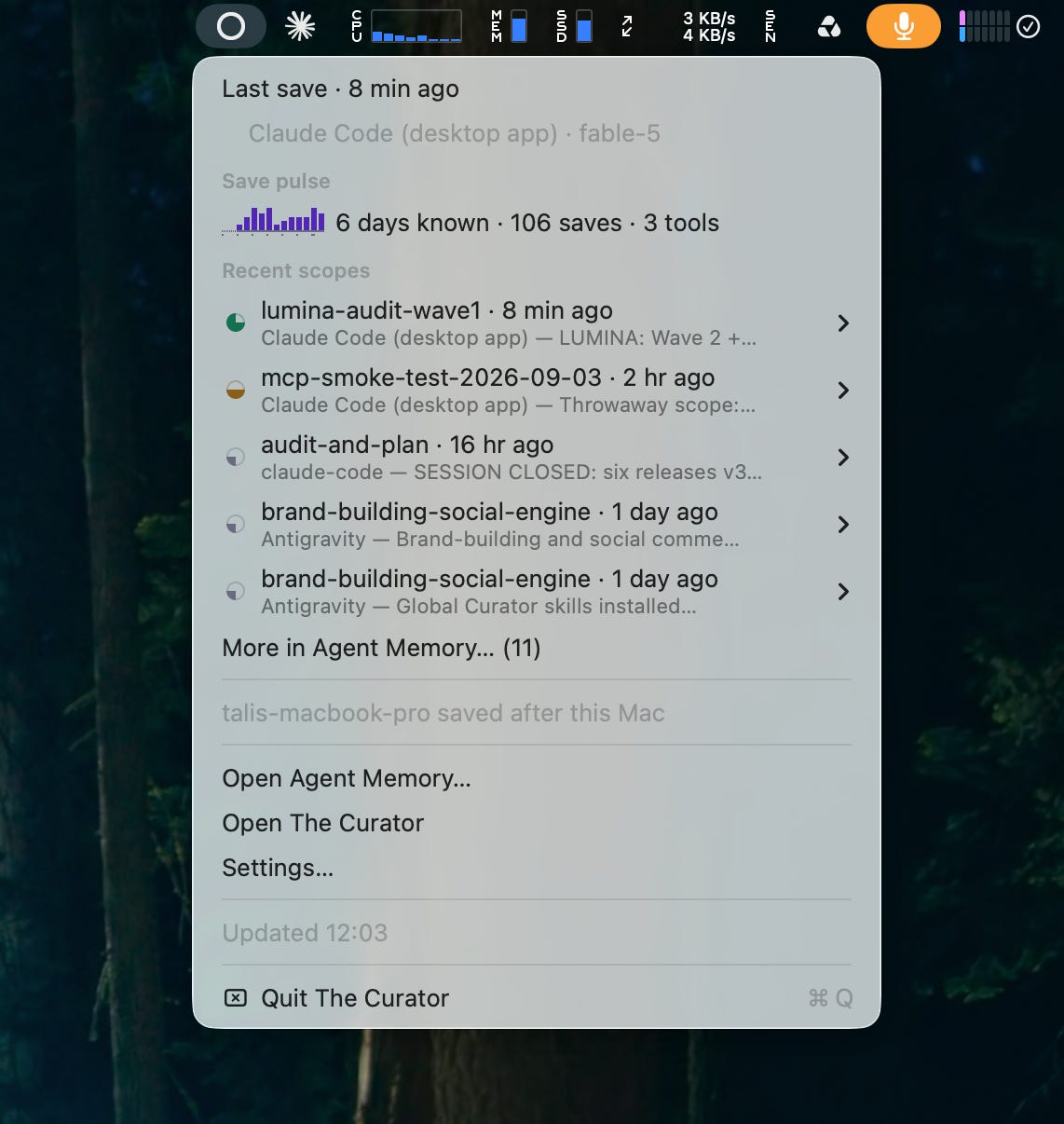
The menu bar widget, free with the Mac app. One glance: how many saves this week and from how many tools, which project and tool saved last and with which model, and any notice that needs attention — here, that my other computer saved after this one, so I should sync before I start.
The widget is off by default, turn it on in Settings → General → Appearance → Menu bar. It opens on a seven-day save pulse, then one row per project and tool that saved in the last 24 hours: which tool, which model, how long ago, and the agent’s own one-line headline of what it did. Notices appear directly under the rows they concern, two tools writing the same scope, handoffs waiting on GitHub, another computer that saved after this one. Everything idle is folded away. The app itself can be quit; the bridge and the widget are enough for a working day.
A lesson without an exercise is a lecture, so here is the order in which I set up a new student. The first four steps are all a reader needs; the rest are for agent work.
For your second brain
1. Install. On a Mac, download the .dmg from the Releases page and drag it to Applications. It is not yet notarised, so macOS will refuse it the first time: go to System Settings → Privacy & Security → Open Anyway, once. On Windows or Linux, clone the repository and run the local server, or ask your coding agent to install it for you.
2. Add an API key. Settings → Providers & keys. Gemini has a free tier that is enough to try; Anthropic is paid; OpenRouter is one key onto many vendors, with free models for chat. One model runs every AI job, and every button that spends money tells you what it will cost before it runs.
3. Choose your knowledge folder and connect Personal Sync to a private GitHub repository you create for it, about three minutes. On a second computer, connect the same repository.
4. Create a domain and ingest. Drop in five or ten things you have read on one topic. Ask the chat a question that crosses them. Open the folder in Obsidian and look at the graph. If you teach or work in a team, read about the Shared Brain next.
For your agents’ brain
5. Start a project inside the domain (Domains → Projects → New project). Bring its documents in through Add from this computer or Add from GitHub, or let The Curator seed four skeletons (architecture, decisions, conventions, roadmap) that you or an agent fill in. Mark two or three read first.
6. Write the brief. Goal and “done”; how you want the work done, each rule with its own fallback; firm decisions with their reasons; repository and deployment facts (never secrets); and a “Read before you…” list. The app seeds a template. Half an hour here repays itself every session.
7. Connect each agent tool. In step ⑤ Setup, + Add a tool and follow its four-step guide: the MCP entry, the two skills (my-curator and curator-continuity), the instructions block, one first save. Claude Desktop is set up for you from Settings → MCP bridge.
8. Paste Copy agent instructions at the top of both CLAUDE.md and AGENTS.md, add the .curator-project marker line, and commit and push both.
9. Read the meter. Set your window and your tool’s share in step ④; aim for a session start well under 10–15% of the window.
10. Work. Say “resume <project>”. Check that the first reply reads your rules back. Let it save as it goes. Turn on the menu bar widget and watch the saves land. Sync before you start and after you stop.
Here is the exercise I give in class. For each item, decide where it belongs: brief, handoff, document, or wiki. The answers follow.
1. “We chose Postgres over a document store because refunds need transactions.”
2. “The test suite was at 84 passing before I touched the payment module.”
3. The forty papers you read on regional energy storage.
4. “Never push to main without running the end-to-end suite.”
5. The full architecture of the system, twelve pages.
6. “Tried caching at the API gateway — made latency worse. Don’t retry.”
7. What you have learned, across many incidents, about why your deployments fail on Fridays.
8. The name of the environment variable that holds the Stripe key.
Answers. (1) The brief, under firm decisions — and if the reasoning is long, a document named decisions.md. (2) The handoff — a point-in-time baseline, useless next month. (3) The wiki — knowledge that should compound and connect. (4) The brief — a standing rule, true in every thread. (5) A document, probably read first. (6) The handoff while it is this week’s dead end — but if it is a lesson that will outlive the thread, move it to firm decisions in the brief. (7) The wiki — its value is the pattern across many incidents, so ask an agent to compile it into a page. (8) The brief — the name only. The value belongs in your .env file and nowhere else.
If you hesitated on six and seven, good. That hesitation is the skill. The boundary between state and knowledge is the one the app cannot draw for you.
• Live handover is tested between three harnesses, not the field. Claude Code, Antigravity and Open Code, on one Mac and across two. Codex and Cursor have not been through a live handover.
• Smaller models follow the discipline less reliably. Capable models read, save and re-read consistently in my measurements; small ones do so less often.
• Hooks are measured on one harness. Antigravity’s session-start hook has been seen working once; its end-of-session request has not been observed.
• Multi-person work on one project is untested. The design permits it. Nobody has run it yet.
• The Mac app is not notarised yet. You allow it once.
• Local models cannot yet run the app’s AI jobs. The setting exists and says so.
• Capture stays advisory. Nothing forces an agent to save, and nothing will. A missed save leaves the previous state, never a corrupted one — that is the fail-safe direction, chosen on purpose.
Let us return to the brilliant contractor who forgets everything every evening.
At the start of this article I said you would build her an onboarding pack. Now you know what is in it, and why each part behaves the way it does. The handbook, your canonical documents, is replaced whole and read word for word. Your standing orders, the brief, are yours, rewritten rarely and deliberately, and read back in her first sentence of the day. The note from the previous shift, the handoff, is overwritten as the work moves, so that a solved problem cannot come back. The logbook only grows, and she reads it as history. And the library, your second brain, and your team’s, grows richer with everything anyone reads, and she looks things up in it when the work calls for it, instead of carrying it on her back.
You also know how much to hand her: enough that she starts well, not so much that she starts tired. Around a tenth of her day, not a third.
And you know the thing that makes this more than good management. The pack does not belong to her desk. When she moves to another desk, another harness, another model, another computer, it goes with her, because it was never kept inside any one of them. It is plain markdown, in a folder you own, synced to a repository you own.
I ran this process by hand for three years: foundational documents, a standing brief, hundreds of dated handoff files, and the discipline to write one before every ceiling. It worked, and it cost me something every single day. The Curator is that process, automated as far as it can honestly be automated, and, I hope, a clear enough blackboard that you can learn the process itself, whether or not you ever use my app.
If there is one sentence to take away, it is not about the app:
Give every agent the right context, and not all of it — and make sure that context belongs to you, not to the tool.
Your brain. Your team’s brain. Your agents’ brain. One format, one owner. You.
• Context — everything a model can see at the moment it answers: instructions, documents, conversation, tool results. What is not in context does not exist for the model.
• Context window — the maximum amount of text a model can hold in one session, measured in tokens. Usable context is smaller than advertised; quality degrades as it fills.
• Context rot — the decline in output quality as a session fills: contradicted decisions, repeated questions, regenerated work.
• Agent harness — everything wrapped around a model that lets it act: tools, files, permissions, a loop, an interface. Claude Code, Codex, Cursor, Antigravity and opencode are harnesses.
• Canonical documents (Documents, foundations) — a project’s reference documents — architecture, decisions, conventions — held verbatim and replaced whole.
• Standing brief — one file per project of your standing instructions and firm decisions, read by every agent in every harness on every session.
• Handoff — the agent’s statement of where one thread of work stands right now; overwritten on every save.
• Journal — one line per save, append-only; history, not the present.
• Scope — the name a handoff is saved under: one thread of work. By default, one per tool.
• Knowledge (the wiki) — entities, concepts and summaries built from what you read, organised in domains; accumulates, and is searched rather than loaded.
• Reading budget — the cap on how much document text is sent at the start of a session.
• MCP (Model Context Protocol) — the open standard through which an agent tool launches The Curator’s local bridge and calls its tools.
• Personal Sync — The Curator’s sync of your whole knowledge folder to your own private GitHub repository.
The Curator — open source, MIT licensed: github.com/talirezun/the-curator · product website: mycurator.xyz
• README — what it is, the quick start and what it costs
• User guide — in particular the three kinds of context, how to choose the right context, session start and the context window, writing a standing brief, how to organise your work-streams, the setup checklist for several tools and computers, the Setup check in the app and the menu bar icon
• Working state — the technical reference
• My Curator MCP guide and Personal Sync
• Research articles — the long-form essays that accompany the project
Earlier articles in this series — From Lab to Life
• From Graph to Intelligence: The My Curator MCP — the bridge, and why a graph reads differently from a folder
• The Agent Memory Problem — And Why Your Second Brain Might Be the Answer — the landscape of attempts at agent memory
• The Shared Brain: When Second Brains Start Thinking Together — with Dražen Kapusta; the collective layer
• Second Brain to Shared Brain: Building a Neural Network of Your Own Knowledge
• The Handoff Writes Itself — the agent memory layer, when it shipped
• The Curator — Product Update — an earlier release note from the beta period
• Where Your Context Lives — three layers of context in one folder you own
• Every Product Needs a Home — building a modern product website with agents
• The Context Engine — three kinds of context, three write rules, and the measurements
• Context Is the Code: The Complete Three-Phase Process for Building with AI Agents — the manual method this article assumes
• The Mixed Fleet — model specialisation and subscription lock-in
Field Notes — fieldnotes.talirezun.com: Chapter 01 · Context Engineering · Chapter 02 · Agent Memory and Second Brains · Chapter 03 · Coding Agents and Harnesses
Other
• Andrej Karpathy, the LLM-wiki gist — the original spark for the compounding wiki.
• Context & Memory Continuity for Coding Agents: A Chasing Jarvis Field Manual — Vanguard MBA teaching material, COTRUGLI Business School.
Dr. Tali Režun is a Serial Entrepreneur, Business Developer, and Academic at the forefront of frontier technologies. As Vice Dean of Frontier Technologies at COTRUGLI Business School, he leads AI innovation initiatives and shapes MBA curricula for the next generation of technology leaders. With over 30 years of entrepreneurial experience — founding and scaling ventures including The Curator, Lumina AI, Moj AI, Block Labs, 4thTech, Immu3, PollinationX, and Online Guerrilla — he bridges cutting-edge research in AI and Web3 with practical business transformation.
Tali’s Links: talirezun.com · X · LinkedIn · Substack · Field Notes · COTRUGLI Profile · GitHub
This article is published for research and educational purposes only. The content represents my own experiences, observations and analysis based on hands-on development and daily use of The Curator.
I have not been compensated, sponsored, or otherwise financially supported by any of the companies, platforms, or tools mentioned in this article. Observations about subscription plans and model strengths are my own experience, not vendor claims, and plans and prices change.
Figures on the screenshots are readings from my own projects on 30 September 2026. Token figures in the app are estimates (bytes divided by four). Live handover results are single observations by one person on his own projects, not a benchmark; the measured protocols are set out in the technical reference.
Version numbers and feature status reflect The Curator v3.80.0 on 30 September 2026. Check github.com/talirezun/the-curator for the current state.
Dr. Tali Režun
Vice Dean of Frontier Technologies, COTRUGLI Business School
Published: October 2026 · Part of the From Lab to Life series · The Curator: Article 11
Open source | Local-first | Privacy-first
Originally published on Substack and Medium; a summary is on talirezun.com.
By Dr. Tali Režun · From Lab to Life · Essay · 30 September 2026