


The Curator becomes an app — your brain, your team's brain, your agents' brain
The Curator v3.45.0 · github.com/talirezun/the-curator
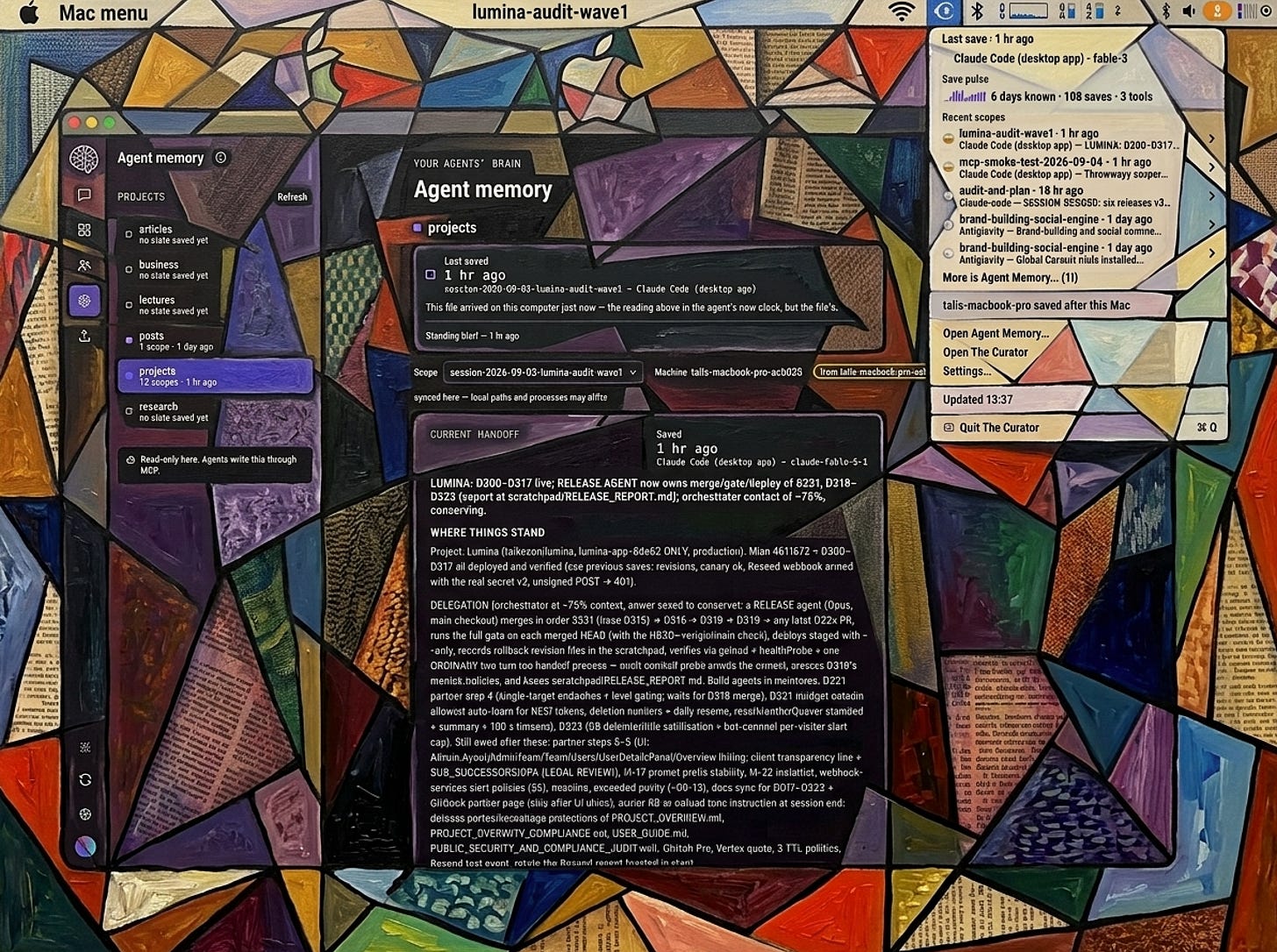
Two hours ago an agent on my machine finished a piece of work and wrote down where it had got to. I know that not because I remember it, and not because I opened anything, but because there is a small icon in my Mac’s menu bar that says so: Last save · 2 hr ago · Claude Code (desktop app) · opus-5. Underneath it, a row of purple bars showing the last seven days of saves. Underneath that, the five most recent workstreams, each with its own one-line summary written by the agent that saved it.
That menu is the smallest surface The Curator has, and it is the one that best explains what the project has become. It is not a dashboard. It is a window onto a store of context that lives in plain markdown files in a folder I chose, on a machine I own, readable by any editor, syncable through a private GitHub repository, and reachable by any agent that speaks MCP.
This is the article about that transformation. The Curator is at v3.45.0 as I write this. It started as something much smaller.
The seed was Andrej Karpathy’s llm-wiki idea: instead of one giant notebook where everything gets lost, keep dedicated, compounding wikis per topic, built out of nothing more exotic than markdown files. Feed a model a source, have it decompose that source into interlinked pages, and let the graph get denser with every addition.
It is a genuinely great idea, and Karpathy framed it mostly as a context store for coding agents. I took it somewhere adjacent. I built The Curator as a second brain builder — for researchers, for people who work with AI, for anyone whose reading outpaces their ability to remember what they read. The whole point was to abstract away the complexity of building and maintaining a knowledge graph, so that the thing you actually do is curate sources and ask good questions.
The first version was simple. One feature mattered: ingest. Drop in a PDF or a markdown file, and The Curator reads it and writes five to fifteen interlinked wiki pages — one summary of the source, plus entity pages for the named things in it and concept pages for the ideas — all cross-referenced, all in your own folder, all openable in Obsidian.
Then the graphs got big, and big graphs rot. So Wiki Health arrived: broken-link rescue, orphan rescue, and later an opt-in AI scan for pages describing the same concept under different names. Maintenance, made tractable.
Then came the MCP bridge, so the graph was not trapped inside my app or only viewed in Obsidian. Any agent harness that speaks the Model Context Protocol could read it. That was primitive at first, and it is where the second life of this project began, because once agents could read the wiki, the obvious next question was whether they could also read something the wiki was not designed to hold.
Then Shared Brain, co-developed with Dražen Kapusta — the same idea, built collectively by a cohort or a team, with each contributor keeping a private brain and opting in only the domains they choose.
And then the third layer, which is what this article is really about.
Here is the whole product in one line:
Your brain → your team’s brain → your agents’ brain.
People tell me this is self-explanatory and then ask me what it means, which tells me it is not. So, plainly:
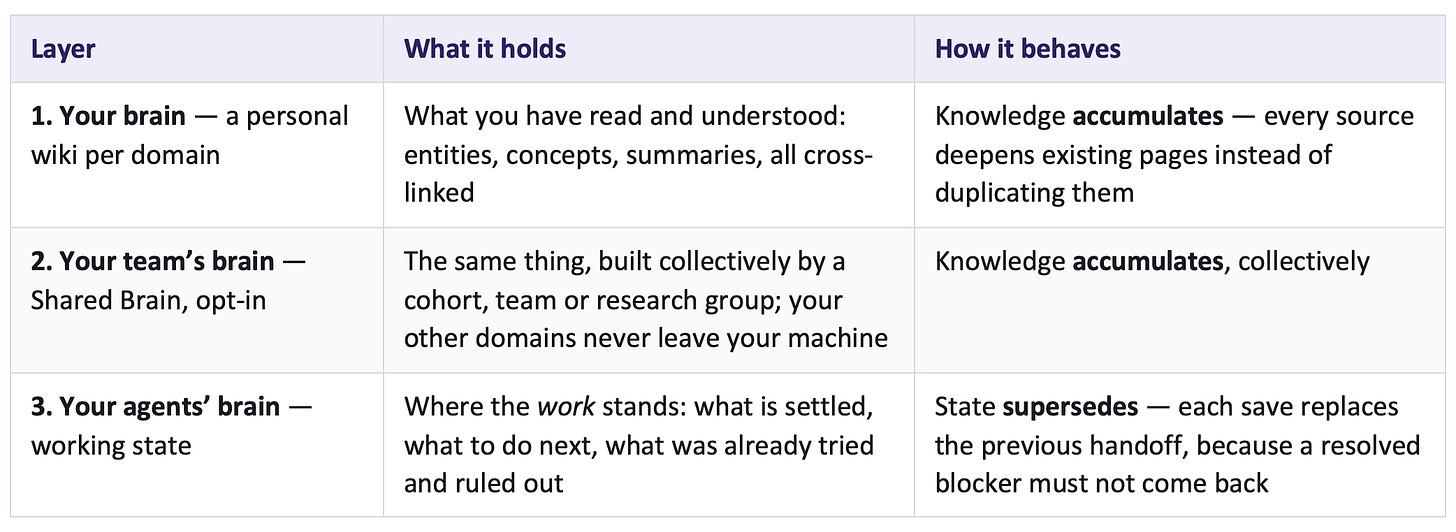
Layers 1 and 2 are built by ingesting sources via The Curator UI or an MCP. That is the means, not the point. Layer 3 is written by your coding agent at the end of a session and read back at the start of the next one — on a different tool, a different model, or a different computer.
The one rule to learn before you use any of it is the difference between the first two layers and the third. Knowledge accumulates; state supersedes. A wiki page unions its bullets: every ingest adds and nothing is dropped, which is exactly right for knowledge and exactly wrong for a handoff, because a union merge has no way to say this is no longer true. “Blocked on the login bug” stops being true the moment you fix it. So working state overwrites. Put something durable into state and the next save takes it, silently, because from the store’s point of view overwriting is correct behaviour.
The reason all three belong in one product is mechanical rather than philosophical. They share one folder, one sync mechanism, one backup, one editor and one bridge to your agents. A knowledge base that cannot carry the state of the work leaves your agents starting cold. A state store that cannot reach durable knowledge makes them re-learn the same subsystem every week. Split them into two products and the user maintains two folders, two syncs, two sets of credentials and a boundary by hand.
Claude Projects, ChatGPT Projects and Cursor rules each hold your accumulated context inside one vendor’s product. That works beautifully right up until the day you switch tools, or switch models, or switch machines — and then you leave it behind. Not by accident. By design.
The Curator’s answer is structural rather than clever: there is no proprietary store to leave behind. The files are the product and the app is a convenience over them. If you dislike the app tomorrow, your knowledge is still markdown in a folder, still syncing to a repository you own, still openable in Obsidian, still readable by anything that speaks MCP.
That matters more every month, because the models are visibly specialising. In my own work the GPT models audit better and the Anthropic models build better, and a whole class of open-weight frontier models has arrived this year that is outstanding at specific jobs. The direction of travel is orchestration: you as the architect, a lead orchestrator dispatching a fleet, one model auditing, another building the front end, a third owning the back end. Every part of that depends on context surviving the move from one model to the next.
If your memory is trapped inside the harness, you do not have a fleet. You have a vendor.
The biggest practical change in this generation is that The Curator is now a Mac application. You download a .dmg from the releases page and install it like anything else. It carries its own runtime, needs no Terminal, and installs its own updates.
On Windows and Linux there is no packaged app, and the browser install remains a first-class way in: clone, npm install, node src/server.js, open localhost:3333. Ingest, chat, wiki, Health, MCP and sync all work identically. What is Mac-only is the packaging — the app bundle, the Dock launcher, the native folder picker and the menu bar widget.
The app is not yet signed with an Apple developer identity. Enrolment is in progress; until it completes, macOS cannot verify who built The Curator, so Gatekeeper refuses a plain double-click. That is a signing status, not a verdict on the app — everything that goes into it is in the public repository.
1. Open Applications and double-click The Curator. macOS blocks it — dismiss the dialog.
2. Open System Settings → Privacy & Security, scroll to Security, and click Open Anyway. Confirm, and enter your password if asked.
3. Open the app again.
The exception is remembered. You do this once, and the updates the app installs for itself never ask again.
On first launch The Curator walks you through two decisions.
Where your knowledge lives. A folder. If you already have one from a browser install, point the app at it and nothing is copied, converted or rebuilt — pointing at the folder is the migration. One warning worth thirty seconds: pick the folder that contains your domains, not one of the domains.
Which model does the work. The Curator has no hosted service and no model of its own; you bring an API key. Three providers are supported:
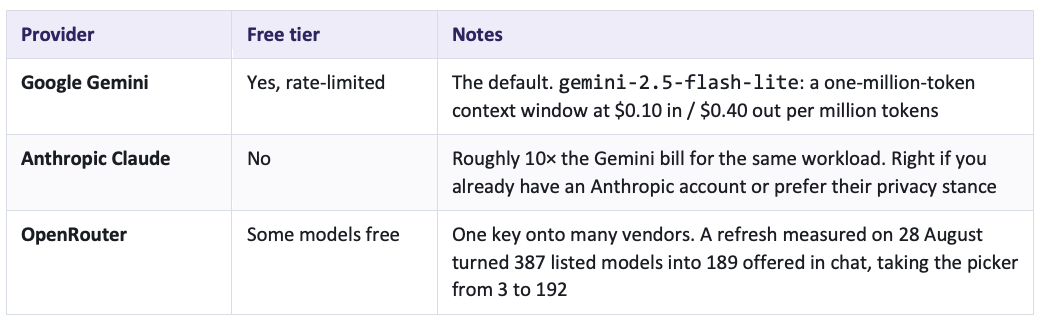
Ingest is where essentially all of the cost goes; chat and AI-assisted Health cleanup are cents, and reading pages, managing domains, syncing, structural Health scans and the MCP bridge itself are free. In practice heavy solo use lands around €5 a month. On the free Gemini tier or a free OpenRouter route it can be nothing at all — enough to try, though not enough to work at volume, which is worth saying plainly rather than discovering mid-batch.
One thing v3.45.0 fixed that had been the most surprising behaviour in the whole product: saving a key no longer moves your build lane. Until then, pasting an OpenRouter key to try a model in chat silently moved your ingests — and your bill — onto a different vendor’s model. Connecting a provider now connects it, and nothing else. The model named under What builds your wiki is always the truth.
The memory layer is written by agents, over MCP, while you are doing something else entirely — and increasingly by more than one agent, in more than one harness, on more than one machine. Before the widget, the only way to see any of that was to open the app and navigate to the Agent Memory view.
So there is now a menu bar icon. It is off by default, because a brand-new install has no agent memory and the only thing an on-by-default icon could say is “nothing here yet,” which is the worst first impression a feature can make. You turn it on in Settings → General → Menu bar.
Click it and you get, in this order:
• The answer, first. Last save · 2 hr ago, and underneath it which harness and which model wrote it.
• The save pulse. A drawn strip covering the last seven days, folded into twelve-hour cells, with a baseline axis, a day ruler and amber caps where the work changed hands between harnesses. Beside it: 6 days known · 73 saves · 2 tools. It is a heartbeat, not a scoreboard — darkness means how often, never how well.
• Recent scopes. Up to five workstreams, newest first. Each carries a one-line headline the agent itself wrote, the harness and model that wrote it, and a small recency mark — a clock draining from full through three-quarters, half and a quarter to empty, teal for the last half hour, amber for earlier today, grey beyond. Each row has a submenu: open it in The Curator, copy a resume prompt, copy the whole handoff as markdown, reveal the file in Finder.
• Then the doors. Open Agent Memory, Open The Curator, Settings, and an Updated 11:30 line telling you when the reading was taken.
Two details in there are load-bearing and easy to miss.
The first is which clock a time came from. A row that says 4 min ago is using the agent’s own clock, recorded in the journal when it saved. A row that says changed 4 min ago is using the file’s timestamp on this disk — and for a handoff that arrived over sync, that is when it landed here, not when it was written, because git rewrites file times on checkout. A row with no known save time says time unknown and sorts to the bottom, never the top. This is the one place the widget could most easily have lied: on a second computer, every handoff you pulled would read as “just now” if it used file times, and the strongest signal in the whole design would be wrong in exactly the situation it exists for.
The second is what it refuses to draw. No progress bar for a save, because a save is not partly done — it has happened or it has not, and a bar would be theatre. No line graph of saves over time, because a line between two points claims something existed in between. Nothing where “more saves” looks like “more progress,” because save frequency is a setting, not an achievement. And no CPU or memory meter for The Curator itself, because nobody installed a second brain to watch it breathe.
Left on, the whole thing costs roughly 0.025% of one core. It works by watching the folder and doing nothing until something changes.
My Curator MCP is a local server that any MCP-capable client spawns as a child process. It exposes twenty tools — twelve that read and eight in the write block, of which five actually change anything on disk. It does not need the web app running, and nothing leaves your machine.
The read tools are not a search box. list_domains and get_index orient. search_wiki and search_cross_domain find, the second across every domain at once. get_node reads a page in full, with its outgoing links and its backlinks. get_graph_overview returns a topology snapshot — counts, hubs, orphans, top tags — in about 4 KB at any scale. get_connected_nodes traverses outward across hops. get_backlinks answers who mentions this?, which a flat index cannot answer at all. get_raw_source fetches the original document a summary was built from. And get_working_state reads the handoff.
The write tools let a model maintain and grow the graph from inside its own conversation: compile_to_wiki turns a research session into permanent pages through the same merge pipeline as an ingest, the Health tools find and repair structural damage, and save_working_state writes the handoff.
Every write is capped, dry-runnable, idempotent and logged to a local audit file. A confused model cannot trash your wiki in one call.
The honest boundary, because it is structural rather than a bug: the bridge is a stdio child process. Any client that can spawn a local program reaches it — Claude Code, Claude Desktop, Cursor, Open Code and other MCP-capable agents. A browser-only assistant cannot, by construction. The limit is the transport, not the vendor.
The agent-memory layer has three tiers, and the distinction between them is the thing that makes it work.
The standing brief (project.md) is one per project, and you write it by hand. No tool writes it. It holds what this project is, the firm decisions that hold across every session, the working model, and where the depth lives. It changes rarely and deliberately, and it is returned on every read, whichever workstream you ask about. An agent reading it is told to treat its standing directives as your instructions given in advance, to restate in one line which ones it is adopting, and to say so rather than go quiet if one clashes with its own rules.
A scope is one workstream inside a project — main, auth-refactor, v4-migration. Three features of one product are three scopes sharing one brief. My own convention is one scope per session, named session-YYYY-MM-DD-topic, because two sessions can easily share a day.
The handoff (current.md) holds where things stand, and it carries six sections: where things stand, firm decisions, traps and dead ends, next steps, observations, open questions. The order was not chosen alphabetically. Decisions and traps render above next steps, because both of them say “do not do this,” and a model that starts executing the action list on sight would otherwise meet the dead end before it meets the warning about it. That ordering was measured with live models rather than reasoned about.
The journal (journal.jsonl) appends one line per save — timestamp, workstream, machine, harness, model, headline. It is append-only, so the history of headlines survives even though the handoff itself does not.
The ritual has inverted. Instead of one enormous write performed by the most degraded version of the model — which is exactly what the old manual practice asked for, at the worst possible moment — the discipline is save early and save often. A save overwrites, which makes it idempotent, which makes it cheap. Save after any material decision, whenever something fails for a reason worth knowing, whenever a baseline is established, before anything long or risky. Miss one and you lose ten tool calls, not a session.
The next session — new window, different model, different harness, or a different machine entirely — starts with one sentence: read the working state for scope X in project Y and carry on.
Our own measurement, not a benchmark, and small: one seeded realistic software project, one open architecture question, two providers, eight runs, $0.074 of API spend.
Without the working state, the model proposed a command the project had already recorded as failed in 3 of 4 runs, and an architecture the team had explicitly ruled out for compliance reasons in 4 of 4. With the handoff present: 0 of 4 for both. On a separate reading against this project’s own real handoff, asking an open “what should I do next?”, the model named the correct top priority 0 of 4 times without state and 8 of 8 with it.
Read that as the shape of the effect at N=4 per condition, not as a constant. But the shape is worth having.
Here is the part that surprises people most.
Working state lives inside a domain, and a domain is a folder. That folder syncs to your own private GitHub repository. Each machine writes into its own path, so two computers never collide, and a read that names a scope but not a machine returns the most recently written one — which is precisely what makes cross-machine handoff work.
So: laptop in the morning, desktop in the afternoon, a different harness in the evening because your credits ran out on the first one. Sync the folder and every agent, everywhere, knows exactly where the build stands. Not a summary of where it stands. The actual document the last agent wrote.
And that is the democratisation argument in concrete form. If you exhaust your quota in one harness, you continue in another. If you would rather run an open-weight model locally on a machine strong enough for it, you continue there. Nothing about your accumulated context objects, because your context was never inside the tool you are leaving.
The memory layer is not the whole picture, and I want to be precise about what sits where, because this is the part practitioners get wrong.
• Foundational documentation — architecture, blueprint, UI/UX, security — lives in the project’s own repository, alongside the code. It is not locked into any harness and it is maintained throughout the build. This is Phase 1 work and nothing downstream gets easier because you skipped it.
• The standing brief is the short, standing instruction set for agents on this project. You perfect it, you fine-tune it, and it stays put while scopes get replaced beneath it.
• The handoff is the current state, and it is replaced on every save.
• The wiki is the compounding knowledge an MCP-connected agent can query — the reasoning and the timeline, not the source code, which version control already handles perfectly well.
Four things, one folder for two of them, one repository for the others, and a single bridge that reaches all of it.
I would rather you hear this from me than discover it.
• Capture is advisory. Nothing forces an agent to save. The skill tells it to save after every decision and every ten or so tool calls, and the menubar widget re-reads the store every few minutes so you can see when it last did, but no timer and no hook writes on its behalf. A missed save returns the previous state, stale but never corrupted.
• The saving discipline is only partly portable. The store is readable by anything that speaks MCP. The skill that carries the discipline of saving is ordinary prose and works anywhere you can paste it, but how it switches on is Claude-shaped today. An agent in another harness can read working state fine; nothing yet tells it to write.
• A handoff cures ignorance, not disagreement. It reliably tells the next session what it does not know. It does not bind it.
• Automatic sync is not built. Every sync operation happens because a human clicked something. The research concluded automatic push is safe and automatic pull is not, so pull stays a decision you make.
• Shared Brain is still opt-in beta. It has been through a structured audit, a data-integrity pass, real admin tooling, GDPR-grade erasure, and a production battle-test that found two real concurrency bugs before any user could hit them. The offline suite is green and the live sweep is green. What has not happened is the one test that cannot be simulated: a real cohort, using it together, over a term. The Vanguard MBA cohort at COTRUGLI remains the natural first audience, and that pilot is the gate to general availability.
• Local models are not available yet. The provider row exists in Settings and is marked unavailable.
• The app is not notarised yet. Hence the one-minute detour above.
I want to close with something about how this got here, because it says more about the project than any feature list.
On 23 August The Curator was at v3.1.2. On 2 September it shipped v3.45.0. In the thirty hours between the morning of 1 September and mid-afternoon on the 2nd, ten releases went out: v3.37.0 through v3.45.0, six of them on a single day.
That pace is not a solo achievement and it is not a boast about typing speed. It is what happens when a maintainer uses his own tool for real work every day, a community reports precisely what broke, and the context to act on all of it survives from one session to the next. Most of the recent work in this project came directly from someone using it and saying what went wrong — including one incident where connecting sync destroyed four hours of my own working state, which is why the sync connect flow now measures and refuses rather than proceeds.
The repository sits at 56 stars and 9 forks today. Small numbers. But the people behind them have shaped this product more than any roadmap did, and I am grateful for it in a way that is hard to put in a release note.
This is a milestone, not a destination. The next steps are already visible: the cohort pilot that unlocks Shared Brain general availability; raw-source fidelity across machines; connectors that let a Company Brain ingest from the systems an organisation already runs; a richer panel behind the menu bar icon; and eventually the mixed-fleet orchestration that all of this is quietly a prerequisite for.
But the thing I built, I built because I needed it. For two years I ran this process by hand — foundational documents, a standing brief file, hundreds of dated handoff markdown files, and the discipline to write one before every context ceiling. It worked, and it cost me something every single day. The Curator is the automation of that process, as much of it as can honestly be automated.
Without proper context you cannot get good results from AI. That is not an opinion. It is the single most reliable observation I have from three years of building this way. Everything good downstream depends on context, and nearly everything bad downstream traces back to its absence.
So: three layers, one format, one owner.
You.
• Context window — the total text a model holds in working memory during one session. Effective usable context is smaller than the advertised number; quality degrades well before the ceiling.
• Context rot — the gradual decline in output quality as a session fills. The model starts contradicting earlier decisions and quietly regenerating work it already did.
• Agent harness — everything wrapped around a model that lets it operate: tool integrations, memory, permissions, interface. Claude Code, Codex, Cursor and opencode are harnesses; they can run different models, and the same model behaves differently in each.
• State supersedes; knowledge accumulates — the rule separating the wiki from working state. A wiki page grows with every ingest and drops nothing. A handoff is replaced on every save, because a union merge cannot express this is no longer true.
• Scope — one workstream inside a project, and the thing that holds a handoff. Multiple scopes share one standing brief.
• MCP (Model Context Protocol) — the open standard the bridge speaks. A local stdio process, which is why any local MCP client can read your state and a browser-only assistant cannot.
• Harness-agnostic — the property that follows from continuity living in files rather than in a tool. A session that started in one harness can finish in another, which is the precondition for a mixed fleet.
The Curator — open source, MIT licensed: github.com/talirezun/the-curator
Documentation referenced throughout: the Product Overview, the User Guide, Working State, the My Curator MCP guide, the menu bar widget roadmap, the Shared Brain guides, and Use Cases — all in the repository’s docs/ folder.
From Lab to Life — talirezun.substack.com
• The Handoff Writes Itself — the design of the agent memory layer
• Second Brain to Shared Brain — the collective layer, in build
• The Curator — Product Update
• The Shared Brain: When Second Brains Start Thinking Together
• The Agent Memory Problem, and Why It Matters
• From Graph to Intelligence: The My Curator MCP
• Context Is the Code: The Complete Three-Phase Process for Building with AI Agents
• The Mixed Fleet — model specialisation, subscription lock-in, and the orchestrating harness that does not exist yet
Teaching material — Context & Memory Continuity for Coding Agents: A Chasing Jarvis Field Manual, Vanguard MBA, COTRUGLI Business School. The manual version of the manual process this feature automates.
Origin — Andrej Karpathy’s llm-wiki concept.
Dr. Tali Režun is a Serial Entrepreneur, Business Developer, and Academic at the forefront of frontier technologies. As Vice Dean of Frontier Technologies at COTRUGLI Business School, he leads AI innovation initiatives and shapes MBA curricula for the next generation of technology leaders. With over 30 years of entrepreneurial experience — founding and scaling ventures including The Curator, Lumina AI, Moj AI, Block Labs, 4thTech, Immu3, PollinationX — he bridges cutting-edge research in AI and Web3 with practical business transformation.
Links: talirezun.com · X (@talirezun) · LinkedIn · Substack · Field Notes · GitHub
Research and educational purpose. This article is published for research and educational purposes only. The content represents my personal experiences, observations, and analysis based on extensive hands-on development and testing of The Curator.
No commercial relationships. I have not been compensated, sponsored, or otherwise financially supported by any of the companies, platforms, or tools mentioned in this article.
Measurements. Figures described as measurements are exactly that — small, dated readings taken against real data, reported with their sample sizes. They are not benchmarks and should not be read as constants. Model prices, model catalogues and tool counts move between releases.
Originally published on Substack and Medium; a summary is on talirezun.com.
By Dr. Tali Režun · From Lab to Life · Essay · 3 September 2026